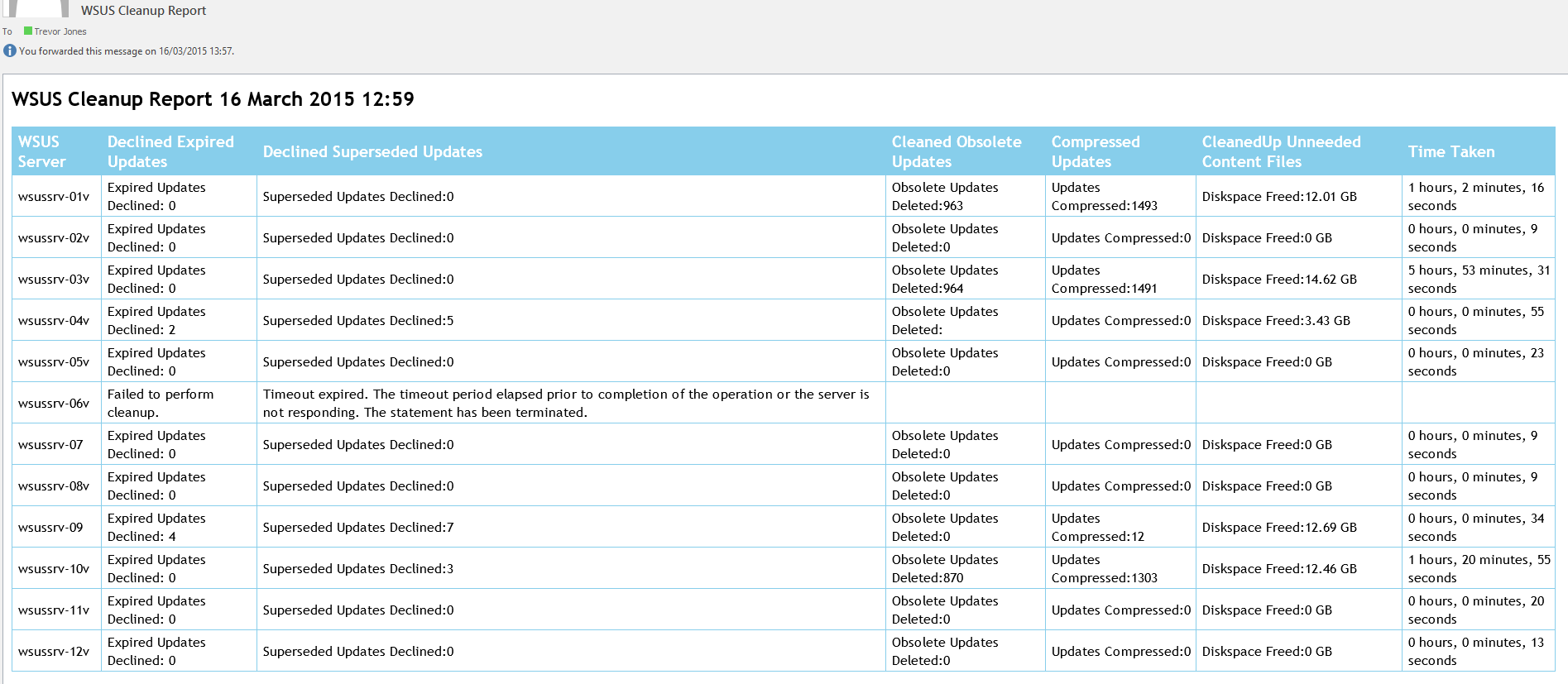
There are a few scripts out there that will perform a cleanup of your WSUS server/s, but here’s my contribution 🙂 It uses the Invoke-WSUSServerCleanup cmdlet only available in Windows Server 2012 / Windows 8 onwards, so for previous versions try something like Kaido Järvemets’ script. This script will perform the WSUS cleanup for any number of WSUS servers, then send you a summary html email report. It will also give you the time taken for each WSUS server to perform the cleanup, convert the ‘Freed diskpace’ value into a more useful GB value, and report any errors that occurred trying to perform the cleanup. An error can sometimes occur when maintenance has not been performed for a long time on the server, and the cleanup can timeout.
Simply add your WSUS server names to the $WSUSservers variable, and add the mail settings for your environment. If you are using upstream/downstream WSUS servers, perform the cleanup on the lowermost downstream server first, and work up the heirarchy, as recommended by Microsoft.
You can then run the script as a scheduled task to perform regular maintenance.
$WSUSServers = @(
    "wsussrv-01v",
    "wsussrv-02v",
    "wsussrv-03v",
    "wsussrv-04v",
    "wsussrv-05v",
    "wsussrv-06v",
    "wsussrv-07",
    "wsussrv-08v",
    "wsussrv-09",
    "wsussrv-10v",
    "wsussrv-11v",
    "wsussrv-12v"
    )

# Mail settings
$smtpserver =  "mysmtpserver"
$MailSubject = "WSUS Cleanup Report"
$MailRecipients = "trevor.jones@contoso.com"
$FromAddress = "WSUS@contoso.com"

# Location of temp file for email message body (will be removed after)
$msgfile = "$env:Temp\mailmessage.txt"

$ErrorActionPreference = "Stop"

#region Functions
function New-Table (
$Title,
$Topic1,
$Topic2,
$Topic3,
$Topic4,
$Topic5,
$Topic6,
$Topic7

)
{
       Add-Content $msgfile "<style>table {border-collapse: collapse;font-family: ""Trebuchet MS"", Arial, Helvetica, sans-serif;}"
       Add-Content $msgfile "h2 {font-family: ""Trebuchet MS"", Arial, Helvetica, sans-serif;}"
       Add-Content $msgfile "th, td {font-size: 1em;border: 1px solid #87ceeb;padding: 3px 7px 2px 7px;}"
       Add-Content $msgfile "th {font-size: 1.2em;text-align: left;padding-top: 5px;padding-bottom: 4px;background-color: #87ceeb;color: #ffffff;}</style>"
       Add-Content $msgfile "<h2>$Title</h2>"
       Add-Content $msgfile "<p><table>"
       Add-Content $msgfile "<tr><th>$Topic1</th><th>$Topic2</th><th>$Topic3</th><th>$Topic4</th><th>$Topic5</th><th>$Topic6</th><th>$Topic7</th></tr>"
}

function New-TableRow (
$col1,
$col2,
$col3,
$col4,
$col5,
$col6,
$col7

)
{
Add-Content $msgfile "<tr><td>$col1</td><td>$col2</td><td>$col3</td><td>$col4</td><td>$col5</td><td>$col6</td><td>$col7</td></tr>"
}

function New-TableEnd {
Add-Content $msgfile "</table></p>"}
#endregion


# Create file
New-Item $msgfile -ItemType file -Force | Out-Null

# Add html header
Add-Content $msgfile "<style>h2 {font-family: ""Trebuchet MS"", Arial, Helvetica, sans-serif;}</style>"
Add-Content $msgfile "<p></p>"

# Create a new html table
New-Table -Title "WSUS Cleanup Report $(Get-Date -Format f)" -Topic1 "WSUS Server" -Topic2 "Declined Expired Updates" -Topic3 "Declined Superseded Updates" -Topic4 "Cleaned Obsolete Updates" -Topic5 "Compressed Updates" -Topic6 "CleanedUp Unneeded Content Files" -Topic7 "Time Taken"


# Run the cleanup on each server
foreach ($WsusServer in $WSUSServers)
    {
        try
            {
            $startDTM = (Get-Date)
            write-host "Doing cleanup on $WSUSServer"
            $Cleanup = Get-WsusServer -Name $WsusServer -PortNumber 8530 | Invoke-WsusServerCleanup -DeclineExpiredUpdates -DeclineSupersededUpdates -CleanupObsoleteUpdates -CompressUpdates -CleanupUnneededContentFiles
            $endDTM = (Get-Date)
            $Time = $endDTM-$startDTM
            $TimeTaken = $Time.Hours.ToString() + " hours, " + $Time.Minutes.ToString() + " minutes, " + $Time.Seconds.ToString() + " seconds"
            $DiskspaceFreed = $cleanup[4].Split(":")[0] + ":" + ([math]::round(($cleanup[4].Split(":")[1] / 1GB),2)).ToString() + " GB"
            New-TableRow -col1 $WSUSServer -col2 $Cleanup[1] -col3 $Cleanup[0].Replace("Obsolete Updates Deleted", "Superseded Updates Declined") -col4 $Cleanup[2] -col5 $Cleanup[3] -col6 $DiskspaceFreed -col7 $TimeTaken
            }
        catch
            {
            New-TableRow -col1 $WSUSServer -col2 "Failed to perform cleanup." -col3 $($_.Exception.Message)
            }
    }

# Add html table to file
New-TableEnd

# Set email body content
$mailbody = Get-Content $msgfile

Send-MailMessage -Body "$mailbody" -From $FromAddress -to $MailRecipients -SmtpServer $smtpserver -Subject $MailSubject -BodyAsHtml

# Delete tempfile
Remove-Item $msgfile
You can follow the cleanup process on each server from the SoftwareDistribution.log located at %ProgramFiles%\Update Services\LogFiles.
