Skip to content
  • smsagent.blog
  • Blog Posts
  • docs.smsagent.blog
  • Github
  • Gists
  • YouTube

Getting an access token for Microsoft Entra in PowerShell using the Web Account Manager (WAM) broker in Windows

Posted on November 28, 2024November 28, 2024 by Trevor Jones in Azure, C#, Intune, Powershell

Some months ago, in my quest to look at different methods for obtaining an access token interactively for Microsoft Graph in PowerShell, I wrote a simple PowerShell wrapper around the Microsoft.Identity.Client library, aka MSAL.Net – the supported MS library for authenticating with Microsoft Entra. Microsoft’s apps and modules have been trending toward using the Web Account Manager (WAM) in Windows to authenticate, so I spent some time looking at how this can be done in PowerShell. WAM is an authentication broker that can deal with access tokens for accounts already connected to your Windows device. According to Microsoft, this has several benefits:

  • Enhanced security. Many security enhancements will be delivered with the broker, without needing to update the application logic.
  • Feature support. With the help of the broker developers can access rich OS and service capabilities such as Windows Hello, conditional access policies, and FIDO keys without writing extra scaffolding code.
  • System integration. Applications that use the broker plug-and-play with the built-in account picker, allowing the user to quickly pick an existing account instead of reentering the same credentials over and over.
  • Token Protection. WAM ensures that the refresh tokens are device bound and enables apps to acquire device bound access tokens

Figuring out how to use WAM in PowerShell was a more challenging endeavour than I anticipated though! Similar to before, I wrote wrapper code around the Microsoft.Identity.Client library, but this time it didn’t play so well. The main hurdle I couldn’t overcome was that to use the WAM broker, it is necessary to call an extension method on the PublicClientApplicationBuilder called “WithBroker”. This method exists in the Microsoft.Identity.Client library, however the method that works with the WAM broker is in a separate library – Microsoft.Identity.Client.Broker. No amount of my trying could get PowerShell to use this extension method instead of the native one. Probably at some point this extension method will find its way into the main library, but until then the only way I could make this work was to port some C# code into PowerShell.

Porting code had its own challenges, as it was necessary to figure out which dependent assemblies the code needed to reference.

Long story short, we have some working code finally 🙂 As before, it requires the Az.Accounts module to be installed because most all the required libraries are already present in this module, negating the need to download them separately. It also only works in PowerShell Core (sorry .Net framework lovers!)

Since my most common use for this is to get an access token for Microsoft Graph, I set the default client Id (aka app Id) to that of the Entra app created by the Microsoft Graph PowerShell SDK, and the default scope to “https://graph.microsoft.com/.default”, but you can change these values to other app Ids and scopes as required, for example to get an access token for Azure SQL database using the Azure CLI or Azure PowerShell apps (another use case of mine!)

To use WAM, the Entra app you use does need to have the following redirect URL added:

ms-appx-web://microsoft.aad.brokerplugin/<appId>

A tenant Id is not required so that the Windows-native account picker will display and allows you to select from any work or school or Microsoft accounts connected to Windows.
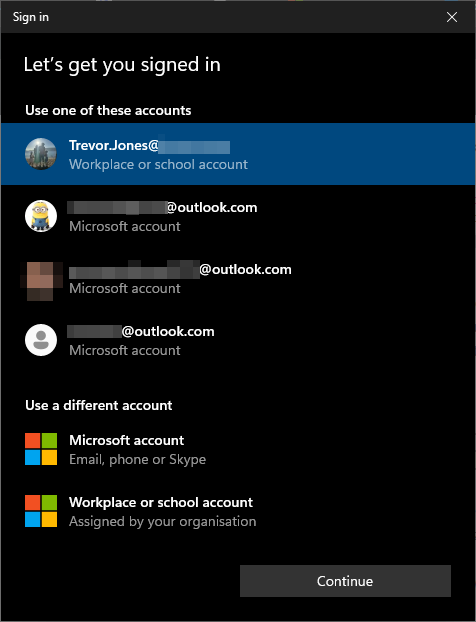
WAM account picker

One thing to note about this account picker is that can sometimes appear behind the current window, or even on a different screen, so do check if it seems nothing is happening. Hopefully Microsoft will fix that at some point.

Once an access token is obtained, it will be cached. This makes it much faster to retrieve the access token again in the same session. When a token has expired, it will be refreshed on the next token request in the same session.

One small bug is that if you try to request an access token for a different client Id or scope in the same session, it may error with the following. I haven’t yet figured out why this happens 😳

Here are a couple of example for how to use it:

# Obtain an access token for the Microsoft Graph API using the Microsoft Graph PowerShell SDK app
Get-EntraAccessTokenWithWAM
# Obtain an access token for the Azure SQL Database using the Azure CLI app
Get-EntraAccessTokenWithWAM -Scopes "https://database.windows.net/.default" -ClientId "04b07795-8ddb-461a-bbee-02f9e1bf7b46"
# Obtain an access token for the Azure SQL Database using the Azure PowerShell app
Get-EntraAccessTokenWithWAM -Scopes "https://database.windows.net/.default" -ClientId "1950a258-227b-4e31-a9cf-717495945fc2"

And here’s the code 👍

Function Get-EntraAccessTokenWithWAM {
[CmdletBinding()]
param (
[Parameter()]
[string]
$ClientId = "14d82eec-204b-4c2f-b7e8-296a70dab67e", # Microsoft Graph PowerShell
[Parameter()]
[string[]]
$Scopes = "https://graph.microsoft.com/.default",
[Parameter()]
[string]
$RedirectUri = "http://localhost"
)
# Makre sure we're running in PowerShell Core edition
If ($PSEdition -ne "Core")
{
Write-Warning "This function is only supported in PowerShell Core"
return
}
# Check for Az.Accounts module
$AzAccountsModule = Get-Module –Name Az.Accounts –ListAvailable
If ($null -eq $AzAccountsModule)
{
try
{
Install-Module –Name Az.Accounts –Force –AllowClobber –Scope CurrentUser –Repository PSGallery –ErrorAction Stop
}
catch
{
throw "Failed to install Az.Accounts module: $_"
}
}
# Import Az.Accounts module
try
{
Import-Module Az.Accounts –ErrorAction Stop
}
catch
{
throw $_
}
# Find the location of the Azure.Common assembly
$LoadedAssemblies = [System.AppDomain]::CurrentDomain.GetAssemblies() | Select –ExpandProperty Location
$AzureCommon = $LoadedAssemblies |
Where-Object { $_ -match "\\Modules\\Az.Accounts\\" -and $_ -match "Microsoft.Azure.Common" }
$AzureCommonLocation = $AzureCommon.TrimEnd("Microsoft.Azure.Common.dll")
# Locate the required assemblies
$mima = Get-ChildItem –Path $AzureCommonLocation –Filter "Microsoft.IdentityModel.Abstractions.dll" –Recurse –File | Select –ExpandProperty FullName
$mic = Get-ChildItem –Path $AzureCommonLocation –Filter "Microsoft.Identity.Client.dll" –Recurse –File | Select –ExpandProperty FullName
$micb = Get-ChildItem –Path $AzureCommonLocation –Filter "Microsoft.Identity.Client.Broker.dll" –Recurse –File | Select –ExpandProperty FullName
$micni = Get-ChildItem –Path $AzureCommonLocation –Filter "Microsoft.Identity.Client.NativeInterop.dll" –Recurse –File | Select –ExpandProperty FullName
$micem = Get-ChildItem –Path $AzureCommonLocation –Filter "Microsoft.Identity.Client.Extensions.Msal.dll" –Recurse –File | Select –ExpandProperty FullName
$sscpd = Get-ChildItem –Path $AzureCommonLocation –Filter "System.Security.Cryptography.ProtectedData.dll" –Recurse –File | Select –ExpandProperty FullName
# This next one need to come from the .Net Core installation being used
$RuntimeFrameworkMajorVersion = [System.Runtime.InteropServices.RuntimeInformation]::FrameworkDescription.Split()[-1].Split(".")[0]
$dotNetDirectory = Get-ChildItem –Path "C:\Program Files\dotnet\packs\Microsoft.NETCore.App.Ref" –Filter "$RuntimeFrameworkMajorVersion.*" –Directory |
Sort-Object –Property Name –Descending | Select –First 1
$sdts = Get-ChildItem –Path $dotNetDirectory –Filter "System.Diagnostics.TraceSource.dll" –Recurse –File | Select –ExpandProperty FullName
# Load the assemblies
try
{
[void][System.Reflection.Assembly]::LoadFrom($mima)
[void][System.Reflection.Assembly]::LoadFrom($mic)
[void][System.Reflection.Assembly]::LoadFrom($micb)
[void][System.Reflection.Assembly]::LoadFrom($micni)
[void][System.Reflection.Assembly]::LoadFrom($sscpd)
[void][System.Reflection.Assembly]::LoadFrom($sdts)
[void][System.Reflection.Assembly]::LoadFrom($micem)
}
catch
{
throw $_
}
# C# code to do the work since PS will not recognize the .WithBroker() extension method from the broker library
$code = @"
using System;
using System.IO;
using System.Linq;
using System.Runtime.InteropServices;
using System.Threading;
using System.Threading.Tasks;
using Microsoft.Identity.Client;
using Microsoft.Identity.Client.Broker;
using Microsoft.IdentityModel.Abstractions;
using Microsoft.Identity.Client.NativeInterop;
using Microsoft.Identity.Client.Extensions.Msal;
public class PublicClientAppHelper
{
// This gets the window handle of the console window
[DllImport("user32.dll", ExactSpelling = true)]
public static extern IntPtr GetAncestor(IntPtr hwnd, GetAncestorFlags flags);
[DllImport("kernel32.dll")]
public static extern IntPtr GetConsoleWindow();
public enum GetAncestorFlags
{
GetParent = 1,
GetRoot = 2,
GetRootOwner = 3
}
public static IntPtr GetConsoleOrTerminalWindow()
{
IntPtr consoleHandle = GetConsoleWindow();
IntPtr handle = GetAncestor(consoleHandle, GetAncestorFlags.GetRootOwner);
return handle;
}
// Setup a cache for the tokens
private static BrokerOptions brokerOptions = new BrokerOptions(BrokerOptions.OperatingSystems.Windows);
private static string cacheFileName = "msalcache.bin";
private static string cacheFilePath = Path.Combine(MsalCacheHelper.UserRootDirectory, cacheFileName);
private static string cacheDir = Path.GetDirectoryName(cacheFilePath);
private static StorageCreationProperties storageProperties = new StorageCreationPropertiesBuilder(cacheFileName, cacheDir).Build();
// Method for retrieving the access token
public static async Task<string> GetAccessTokenWithWAM(string clientId, string redirectUri, string[] scopes)
{
IPublicClientApplication publicClientApp = PublicClientApplicationBuilder.Create(clientId)
.WithBroker(brokerOptions)
.WithParentActivityOrWindow(GetConsoleOrTerminalWindow)
.WithRedirectUri(redirectUri)
.Build();
var cacheHelper = await MsalCacheHelper.CreateAsync(storageProperties).ConfigureAwait(false);
cacheHelper.RegisterCache(publicClientApp.UserTokenCache);
var accounts = await publicClientApp.GetAccountsAsync();
var existingAccount = accounts.FirstOrDefault();
AuthenticationResult result;
CancellationTokenSource cancellationTokenSource = new CancellationTokenSource(TimeSpan.FromSeconds(90)); // Automatic cancellation after 90 seconds
// try the cache first, fallback to interactive if necessary
try
{
result = existingAccount != null
? await publicClientApp.AcquireTokenSilent(scopes, existingAccount).ExecuteAsync(cancellationTokenSource.Token)
: await publicClientApp.AcquireTokenInteractive(scopes).ExecuteAsync(cancellationTokenSource.Token);
}
catch (MsalUiRequiredException)
{
result = await publicClientApp.AcquireTokenInteractive(scopes).ExecuteAsync(cancellationTokenSource.Token);
}
return result.AccessToken;
}
}
"@
# List of assemblies we need to reference
$assemblies = @($mima, $mic, $micb, $micni, $micem, $sscpd, $sdts, "netstandard", "System.Linq")
# Get the access token
try
{
# If the type already exists in the current session
$token = [PublicClientAppHelper]::GetAccessTokenWithWAM($ClientId, $RedirectUri, $Scopes).GetAwaiter().GetResult()
return $token
}
catch
{
if ($_.FullyQualifiedErrorId -eq "TypeNotFound")
{
try
{
# Add the type if it doesn't exist yet
Add-Type –ReferencedAssemblies $assemblies –TypeDefinition $code –Language CSharp –ErrorAction Stop
$token = [PublicClientAppHelper]::GetAccessTokenWithWAM($ClientId, $RedirectUri, $Scopes).GetAwaiter().GetResult()
return $token
}
catch
{
throw $_
}
}
else
{
throw $_
}
}
}
## Example usage ##
# Obtain an access token for the Microsoft Graph API using the Microsoft Graph PowerShell SDK app
Get-EntraAccessTokenWithWAM
# Obtain an access token for the Azure SQL Database using the Azure CLI app
Get-EntraAccessTokenWithWAM –Scopes "https://database.windows.net/.default" –ClientId "04b07795-8ddb-461a-bbee-02f9e1bf7b46"
# Obtain an access token for the Azure SQL Database using the Azure PowerShell app
Get-EntraAccessTokenWithWAM –Scopes "https://database.windows.net/.default" –ClientId "1950a258-227b-4e31-a9cf-717495945fc2"
view raw Get-EntraAccessTokenWithWAM.ps1 hosted with ❤ by GitHub

Share this:

  • Click to share on X (Opens in new window) X
  • Click to share on Facebook (Opens in new window) Facebook
  • Click to email a link to a friend (Opens in new window) Email
  • Click to print (Opens in new window) Print
  • Click to share on LinkedIn (Opens in new window) LinkedIn
Like Loading...
Tagged access token powershell, Azure, cloud, entra access token, graph powershell token, microsoft, Powershell, Security, wam broker, Web account manager
Unknown's avatar

Published by Trevor Jones

View all posts by Trevor Jones

Post navigation

Previous Post Activating PIM Roles that require MFA or Conditional Access Authentication Context with PowerShell
Next Post Harnessing AI in PowerShell: Create a multi-model command-line AI assistant (Part 1)

Blog Stats

  • 1,832,182 hits

Enter your email address to subscribe to this blog and receive notifications of new posts by email.

Join 852 other subscribers
Blog at WordPress.com.
  • Reblog
  • Subscribe Subscribed
    • smsagent.blog
    • Join 265 other subscribers
    • Already have a WordPress.com account? Log in now.
    • smsagent.blog
    • Subscribe Subscribed
    • Sign up
    • Log in
    • Copy shortlink
    • Report this content
    • View post in Reader
    • Manage subscriptions
    • Collapse this bar
 

Loading Comments...
 

    %d