Keeping your ConfigMgr clients healthy is an important task for an SCCM administrator. Here’s a SQL query that will find all devices in ConfigMgr that have been active in the last 7 days, but have either failed their CCMEval or have “unknown” status, ie no CCMEval results.
Select sys.Name0 as 'ComputerName',sys.User_Name0 as 'UserName',
cs.ClientStateDescription,
DATEDIFF(day,sys.Creation_Date0,cs.LastActiveTime) as 'Days Active',
DATEDIFF(day,cs.LastHealthEvaluation,GetDate()) as 'Days Since Last Eval',
sys.Creation_Date0 as 'SCCM Client Registration Date',
cs.LastActiveTime, cs.LastHealthEvaluation,
case when LastEvaluationHealthy = 1 then 'Pass'
 when LastEvaluationHealthy = 2 then 'Fail'
 when LastEvaluationHealthy = 3 then 'Unknown'
 end as 'Last Evaluation Healthy',
case when cs.ClientRemediationSuccess = 1 then 'Pass'
 when cs.ClientRemediationSuccess = 2 then 'Fail'
 else ''
 end as 'ClientRemediationSuccess',
case when LastHealthEvaluationResult = 1 then 'Not Yet Evaluated'
 when LastHealthEvaluationResult = 2 then 'Not Applicable'
 when LastHealthEvaluationResult = 3 then 'Evaluation Failed'
 when LastHealthEvaluationResult = 4 then 'Evaluated Remediated Failed'
 when LastHealthEvaluationResult = 5 then 'Not Evaluated Dependency Failed'
 when LastHealthEvaluationResult = 6 then 'Evaluated Remediated Succeeded'
 when LastHealthEvaluationResult = 7 then 'Evaluation Succeeded'
 end as 'LastHealthEvaluationResult',
HealthCheckDescription,ResultDetail,ResultCode
from dbo.v_CH_ClientSummary cs
inner join v_R_System sys on cs.ResourceID = sys.ResourceID
left join v_CH_EvalResults eval on cs.ResourceID = eval.ResourceID
where cs.ClientStateDescription in ('Active/Fail','Active/Unknown')
and DATEDIFF(day,sys.Creation_Date0,cs.LastActiveTime) > 7
Order by ClientStateDescription,ComputerName
I like to add SQL queries to PowerShell functions so I can return quick results to my current session:

You can run this query from PowerShell like this (enter your database info at the top of the script):
function Get-CCMEvalFailedOrUnknown
{
# Database info
$dataSource = 'mysqlserver\INST_SCCM'
$database = 'CM_ABC'

$connectionString = "Server=$dataSource;Database=$database;Integrated Security=SSPI;"
$connection = New-Object -TypeName System.Data.SqlClient.SqlConnection
$connection.ConnectionString = $connectionString
$connection.Open()

$Query = "
Select sys.Name0 as 'ComputerName',sys.User_Name0 as 'UserName',
cs.ClientStateDescription,
DATEDIFF(day,sys.Creation_Date0,cs.LastActiveTime) as 'Days Active',
DATEDIFF(day,cs.LastHealthEvaluation,GetDate()) as 'Days Since Last Eval',
sys.Creation_Date0 as 'SCCM Client Registration Date',
cs.LastActiveTime, cs.LastHealthEvaluation,
case when LastEvaluationHealthy = 1 then 'Pass'
 when LastEvaluationHealthy = 2 then 'Fail'
 when LastEvaluationHealthy = 3 then 'Unknown'
 end as 'Last Evaluation Healthy',
case when cs.ClientRemediationSuccess = 1 then 'Pass'
 when cs.ClientRemediationSuccess = 2 then 'Fail'
 else ''
 end as 'ClientRemediationSuccess',
case when LastHealthEvaluationResult = 1 then 'Not Yet Evaluated'
 when LastHealthEvaluationResult = 2 then 'Not Applicable'
 when LastHealthEvaluationResult = 3 then 'Evaluation Failed'
 when LastHealthEvaluationResult = 4 then 'Evaluated Remediated Failed'
 when LastHealthEvaluationResult = 5 then 'Not Evaluated Dependency Failed'
 when LastHealthEvaluationResult = 6 then 'Evaluated Remediated Succeeded'
 when LastHealthEvaluationResult = 7 then 'Evaluation Succeeded'
 end as 'LastHealthEvaluationResult',
HealthCheckDescription,ResultDetail,ResultCode
from dbo.v_CH_ClientSummary cs
inner join v_R_System sys on cs.ResourceID = sys.ResourceID
left join v_CH_EvalResults eval on cs.ResourceID = eval.ResourceID
where cs.ClientStateDescription in ('Active/Fail','Active/Unknown')
and DATEDIFF(day,sys.Creation_Date0,cs.LastActiveTime) > 7
Order by ClientStateDescription,ComputerName

"

$command = $connection.CreateCommand()
$command.CommandText = $Query
$reader = $command.ExecuteReader()
$table = New-Object -TypeName 'System.Data.DataTable'
$table.Load($reader)

# Close the connection
$connection.Close()

return $table
}

Get-CCMEvalFailedOrUnknown | Out-GridView

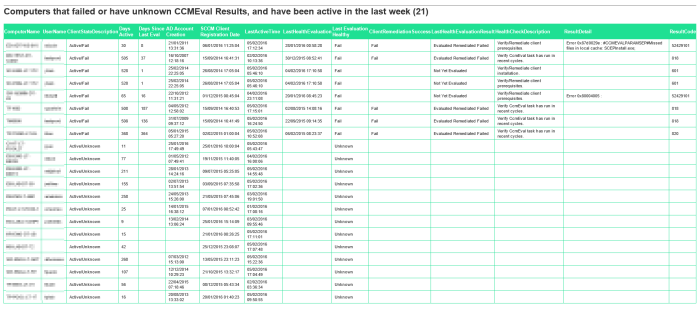
You could also send this as a weekly HTML report by email using the Windows Task Scheduler. Simply use the following code, entering your database and email parameters at the top:
# Database info
$dataSource = 'mysqlserver\INST_SCCM'
$database = 'CM_ABC'

#Email params
$EmailParams = @{
    To         = 'Joe.Bloggs@contoso.com'
    From       = 'PowerShell@contoso.com'
    Smtpserver = 'mysmtpserver'
    Subject    = "Client Health: CCMEval Failed or Unknown Weekly Report $(Get-Date -Format dd-MMM-yyyy)"
}

$connectionString = "Server=$dataSource;Database=$database;Integrated Security=SSPI;"
$connection = New-Object -TypeName System.Data.SqlClient.SqlConnection
$connection.ConnectionString = $connectionString
$connection.Open()

$Query = "
Select sys.Name0 as 'ComputerName',sys.User_Name0 as 'UserName',
cs.ClientStateDescription,
DATEDIFF(day,sys.Creation_Date0,cs.LastActiveTime) as 'Days Active',
DATEDIFF(day,cs.LastHealthEvaluation,GetDate()) as 'Days Since Last Eval',
sys.Creation_Date0 as 'SCCM Client Registration Date',
cs.LastActiveTime, cs.LastHealthEvaluation,
case when LastEvaluationHealthy = 1 then 'Pass'
 when LastEvaluationHealthy = 2 then 'Fail'
 when LastEvaluationHealthy = 3 then 'Unknown'
 end as 'Last Evaluation Healthy',
case when cs.ClientRemediationSuccess = 1 then 'Pass'
 when cs.ClientRemediationSuccess = 2 then 'Fail'
 else ''
 end as 'ClientRemediationSuccess',
case when LastHealthEvaluationResult = 1 then 'Not Yet Evaluated'
 when LastHealthEvaluationResult = 2 then 'Not Applicable'
 when LastHealthEvaluationResult = 3 then 'Evaluation Failed'
 when LastHealthEvaluationResult = 4 then 'Evaluated Remediated Failed'
 when LastHealthEvaluationResult = 5 then 'Not Evaluated Dependency Failed'
 when LastHealthEvaluationResult = 6 then 'Evaluated Remediated Succeeded'
 when LastHealthEvaluationResult = 7 then 'Evaluation Succeeded'
 end as 'LastHealthEvaluationResult',
HealthCheckDescription,ResultDetail,ResultCode
from dbo.v_CH_ClientSummary cs
inner join v_R_System sys on cs.ResourceID = sys.ResourceID
left join v_CH_EvalResults eval on cs.ResourceID = eval.ResourceID
where cs.ClientStateDescription in ('Active/Fail','Active/Unknown')
and DATEDIFF(day,sys.Creation_Date0,cs.LastActiveTime) > 7
Order by ClientStateDescription,ComputerName

"

$command = $connection.CreateCommand()
$command.CommandText = $Query
$reader = $command.ExecuteReader()
$table = New-Object -TypeName 'System.Data.DataTable'
$table.Load($reader)

# Send html email
$style = @"
<style>
body {
    color:#333333;
    font-family: ""Trebuchet MS"", Arial, Helvetica, sans-serif;}
}
h1 {
    text-align:center;
}
h2 {
    border-top:1px solid #666666;
}
table {
    border-collapse: collapse;
    font-family: ""Trebuchet MS"", Arial, Helvetica, sans-serif;
}
th {
    font-size: 10pt;
    text-align: left;
    padding-top: 5px;
    padding-bottom: 4px;
    background-color: #1FE093;
    color: #ffffff;
}
td {
    font-size: 8pt;
    border: 1px solid #1FE093;
    padding: 3px 7px 2px 7px;
}
</style>

"@

$Properties = @(
'ComputerName',
'UserName',
'ClientStateDescription',
'Days Active',
'Days Since Last Eval',
'SCCM Client Registration Date',
'LastActiveTime',
'LastHealthEvaluation',
'Last Evaluation Healthy',
'ClientRemediationSuccess',
'LastHealthEvaluationResult',
'HealthCheckDescription',
'ResultDetail',
'ResultCode'
)

$body = $table |
Select-Object -Property $Properties|
ConvertTo-Html -Head $style -Body "
<H2>Computers that failed or have unknown CCMEval Results, and have been active in the last week ($($results.Count))</H2>

" |
Out-String

Send-MailMessage @EmailParams -Body $Body -BodyAsHtml

# Close the connection
$connection.Close()

How did you know the state names for ‘LastHealthEvaluationResult’ and ‘LastEvaluationHealthy’? It does not appear to be published in the SDK. Thanks.