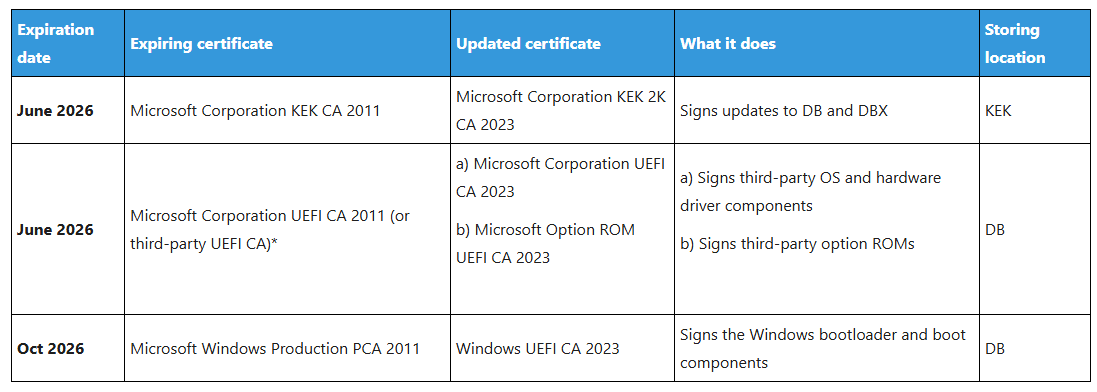
A couple of months back Microsoft published a blog about Secure Boot certificates expiring in June 2026 and of the potential need to take action. It would appear that as long as Secure Boot is enabled, your OEM firmware is up-to-date, you are sending the right diagnostic data, and Windows updates are enabled, devices should receive updated certificates at some point (“in the coming months…”) through Windows update. But how can you check if your Secure Boot certificates have been updated yet? With not a small amount of help from Chat GPT 5 (welcome to the new world), I put together a PowerShell script that parses the Secure Boot databases, extracting the certificates, and checking whether updated certificates are present.

These 4 certificates correspond to the certificates mentioned in the Microsoft blog, in order of appearance.
Interestingly, on my Windows 365 Cloud PC, the first and last certs are already up-to-date, but the “Microsoft Corporation UEFI CA” certificates are not even present, I assume because Windows 365 is a first-party solution and no third-party components are used?
The script could be used as part of an inventory solution to harvest and report on Secure Boot certificate update status, or just deployed as an Intune remediation if you modify the output a bit.
| #Requires -RunAsAdministrator | |
| # Function to read Secure Boot databases (db, KEK, PK, dbx) and parse entries | |
| # Thanks to Chat-GPT 5 | |
| function Read-SecureBootDatabase { | |
| [CmdletBinding()] | |
| param( | |
| [ValidateSet('db','KEK','PK','dbx')] | |
| [string]$DatabaseName = 'db', | |
| # Set to a folder path to export found X.509 certs; or $null to skip exporting | |
| [string]$ExportDir = "C:\Temp\SecureBoot\$DatabaseName" | |
| ) | |
| if ($ExportDir) { | |
| if (-not (Test-Path $ExportDir)) { New-Item –ItemType Directory –Path $ExportDir | Out-Null } | |
| } | |
| # GUIDs per UEFI spec | |
| $GUID_X509 = [guid]'a5c059a1-94e4-4aa7-87b5-ab155c2bf072' # EFI_CERT_X509_GUID | |
| $GUID_SHA256 = [guid]'c1c41626-504c-4092-aca9-41f936934328' # EFI_CERT_SHA256_GUID | |
| $GUID_PKCS7 = [guid]'4aafd29d-68df-49ee-8aa9-347d375665a7' # EFI_CERT_TYPE_PKCS7_GUID | |
| # Helpers (typed copies to avoid Guid ctor issues) | |
| function Get-GuidFromBytes([byte[]]$bytes, [int]$offset) { | |
| $buf = New-Object byte[] 16 | |
| [Buffer]::BlockCopy($bytes, $offset, $buf, 0, 16) | |
| return (New-Object System.Guid (,([byte[]]$buf))) | |
| } | |
| function Read-UInt32LE([byte[]]$bytes, [int]$offset) { | |
| [BitConverter]::ToUInt32($bytes, $offset) | |
| } | |
| function Get-Slice([byte[]]$bytes, [int]$offset, [int]$length) { | |
| $buf = New-Object byte[] $length | |
| [Buffer]::BlockCopy($bytes, $offset, $buf, 0, $length) | |
| return $buf | |
| } | |
| try { | |
| $raw = (Get-SecureBootUEFI $DatabaseName).Bytes | |
| } catch { | |
| Write-Error "Failed to read '$DatabaseName' via Get-SecureBootUEFI: $($_.Exception.Message)" | |
| return | |
| } | |
| if (-not $raw -or $raw.Length -lt 28) { | |
| Write-Warning "'$DatabaseName' is empty or too small to contain any EFI_SIGNATURE_LIST." | |
| return | |
| } | |
| $pos = 0 | |
| $results = New-Object System.Collections.Generic.List[object] | |
| $SIGLIST_HEADER_SIZE = 16 + 4 + 4 + 4 # Type(16) + ListSize(4) + HeaderSize(4) + SigSize(4) | |
| $certCount = 0 | |
| $hashCount = 0 | |
| $listIndex = 0 | |
| while ($pos -le $raw.Length – $SIGLIST_HEADER_SIZE) { | |
| $listIndex++ | |
| $sigType = Get-GuidFromBytes $raw $pos; $pos += 16 | |
| $listSize = Read-UInt32LE $raw $pos; $pos += 4 | |
| $hdrSize = Read-UInt32LE $raw $pos; $pos += 4 | |
| $sigSize = Read-UInt32LE $raw $pos; $pos += 4 | |
| $listStart = $pos – $SIGLIST_HEADER_SIZE | |
| $listEnd = $listStart + $listSize | |
| if ($listSize -lt $SIGLIST_HEADER_SIZE -or $listEnd -gt $raw.Length -or $sigSize -lt 16) { | |
| Write-Warning ("Malformed EFI_SIGNATURE_LIST at offset {0}" -f $listStart) | |
| break | |
| } | |
| # Skip SignatureHeader (commonly 0) | |
| $pos += $hdrSize | |
| # Entries: 16-byte Owner GUID + SignatureData | |
| while ($pos -le $listEnd – $sigSize) { | |
| $owner = Get-GuidFromBytes $raw $pos; $pos += 16 | |
| $dataLen = $sigSize – 16 | |
| $sigData = Get-Slice $raw $pos $dataLen; $pos += $dataLen | |
| if ($sigType -eq $GUID_X509) { | |
| try { | |
| $cert = New-Object System.Security.Cryptography.X509Certificates.X509Certificate2 (,[byte[]]$sigData) | |
| $certCount++ | |
| $results.Add([pscustomobject]@{ | |
| Variable = $DatabaseName | |
| ListIndex = $listIndex | |
| EntryType = 'X509' | |
| Index = $certCount | |
| Subject = $cert.Subject | |
| Issuer = $cert.Issuer | |
| NotBefore = $cert.NotBefore | |
| NotAfter = $cert.NotAfter | |
| Serial = $cert.SerialNumber | |
| Thumbprint = $cert.Thumbprint | |
| OwnerGuid = $owner | |
| }) | |
| if ($ExportDir) { | |
| $outPath = Join-Path $ExportDir ("$DatabaseName-cert-{0:D3}.cer" -f $certCount) | |
| [IO.File]::WriteAllBytes($outPath, $cert.Export([System.Security.Cryptography.X509Certificates.X509ContentType]::Cert)) | |
| } | |
| } catch { | |
| $results.Add([pscustomobject]@{ | |
| Variable = $DatabaseName | |
| ListIndex = $listIndex | |
| EntryType = 'X509 (unparseable)' | |
| Error = $_.Exception.Message | |
| OwnerGuid = $owner | |
| RawLen = $sigData.Length | |
| }) | |
| } | |
| } | |
| elseif ($sigType -eq $GUID_SHA256) { | |
| $hashCount++ | |
| $hex = -join ($sigData | ForEach-Object { $_.ToString('X2') }) | |
| $results.Add([pscustomobject]@{ | |
| Variable = $DatabaseName | |
| ListIndex = $listIndex | |
| EntryType = 'SHA256' | |
| Index = $hashCount | |
| Hash = $hex | |
| OwnerGuid = $owner | |
| }) | |
| } | |
| elseif ($sigType -eq $GUID_PKCS7) { | |
| $results.Add([pscustomobject]@{ | |
| Variable = $DatabaseName | |
| ListIndex = $listIndex | |
| EntryType = 'PKCS7' | |
| DataLen = $sigData.Length | |
| OwnerGuid = $owner | |
| Note = 'PKCS#7 container (not parsed here)' | |
| }) | |
| } | |
| else { | |
| $results.Add([pscustomobject]@{ | |
| Variable = $DatabaseName | |
| ListIndex = $listIndex | |
| EntryType = "Other ($sigType)" | |
| DataLen = $sigData.Length | |
| OwnerGuid = $owner | |
| }) | |
| } | |
| } | |
| # Move to the start of the next list (handles padding) | |
| $pos = $listEnd | |
| } | |
| if ($results.Count -eq 0) { | |
| Write-Warning "No entries found in '$DatabaseName' (or entries are of unsupported types)." | |
| } else { | |
| return $results | |
| } | |
| } | |
| # Confirm Secure Boot is enabled | |
| if (-not ((Confirm-SecureBootUEFI) -eq $true)) { | |
| Write-Warning "Secure Boot is not enabled on this system." | |
| exit | |
| } | |
| # Parse the db and KEK databases | |
| $db = Read-SecureBootDatabase –DatabaseName db –ExportDir $null | |
| $kek = Read-SecureBootDatabase –DatabaseName KEK –ExportDir $null | |
| # Define the new certificate names | |
| $DBWindowsUEFICertSubject = "CN=Windows UEFI CA 2023, O=Microsoft Corporation, C=US" | |
| $KEKCertSubject = "CN=Microsoft Corporation KEK 2K CA 2023, O=Microsoft Corporation, C=US" | |
| $DBCorporationUEFICertSubject = "CN=Microsoft UEFI CA 2023, O=Microsoft Corporation, C=US" | |
| $DBOptionROMUEFICertSubject = "CN=Microsoft Option ROM UEFI CA 2023, O=Microsoft Corporation, C=US" | |
| # Check if the new certificates are present in the respective databases | |
| $DBWindowsUEFICertUpdated = $db.Subject.Contains($DBWindowsUEFICertSubject) | |
| $KEKCertUpdated = $kek.Subject.Contains($KEKCertSubject) | |
| $DBCorporationUEFICertUpdated = $db.Subject.Contains($DBCorporationUEFICertSubject) | |
| $DBOptionROMUEFICertUpdated = $db.Subject.Contains($DBOptionROMUEFICertSubject) | |
| # Output the results | |
| $CertStatus = [PSCustomObject]@{ | |
| KEKCertUpdated = $KEKCertUpdated | |
| DBWindowsUEFICertUpdated = $DBWindowsUEFICertUpdated | |
| DBCorporationUEFICertUpdated = $DBCorporationUEFICertUpdated | |
| DBOptionROMUEFICertUpdated = $DBOptionROMUEFICertUpdated | |
| } | |
| $CertStatus |
