For some time I have run my own reporting solution for Windows Updates since I’ve never really been happy with the canned reports Microsoft have created in Intune and Windows Update for Business reports, even to this day. As part of this solution I have had to gather data on Windows Updates, such as versions, build numbers, editions, release history, support periods, error codes etc. When the solution was first created there was no public API available to get this information from, so I simply scraped Microsoft web pages to get the data. Recently though, I remembered that Microsoft introduced the Windows Updates API in Microsoft Graph which contains some of this data available through a ‘supported’ API. (I say ‘supported’ in quotes since the API is still beta and subject to change, and currently is actually incomplete.)
After playing around with the available data in the API, I came up with a script to extract the data into a number of lists or tables, which then forms a sort of catalog of data on Windows Updates. You could run some automation to regularly import this into a SQL database or some other data repository and reference it in your own reporting.
The script creates 5 lists or tables (data tables are easier to work with when importing into SQL database). Note – I have intentionally excluded updates for Windows Server OS from the lists as the focus is on workstation / client OS.
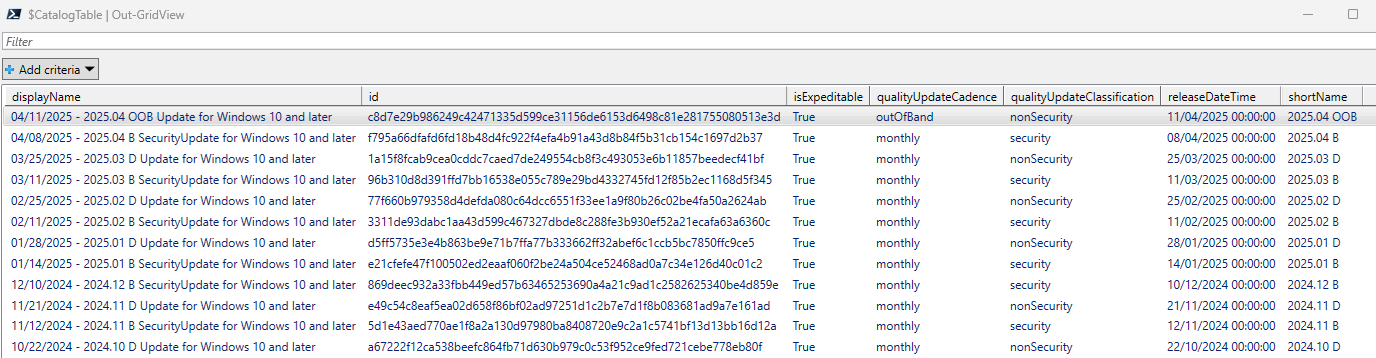
Catalog table
Stored in the variables $CatalogList and $CatalogTable. Contains a list of security and non-security updates and their release dates.
Revision Table
Stored in the variable $RevisionList and $RevisionTable. Contains a list of Windows updates, the Windows versions they apply to, release dates, build numbers, KB number and Urls. This table can be ‘joined’ to the catalog table using the catalogUpdateId column, ie catalog.id > revision.catalogUpdateId.
This table only appears to provide data for in-support OS versions though.

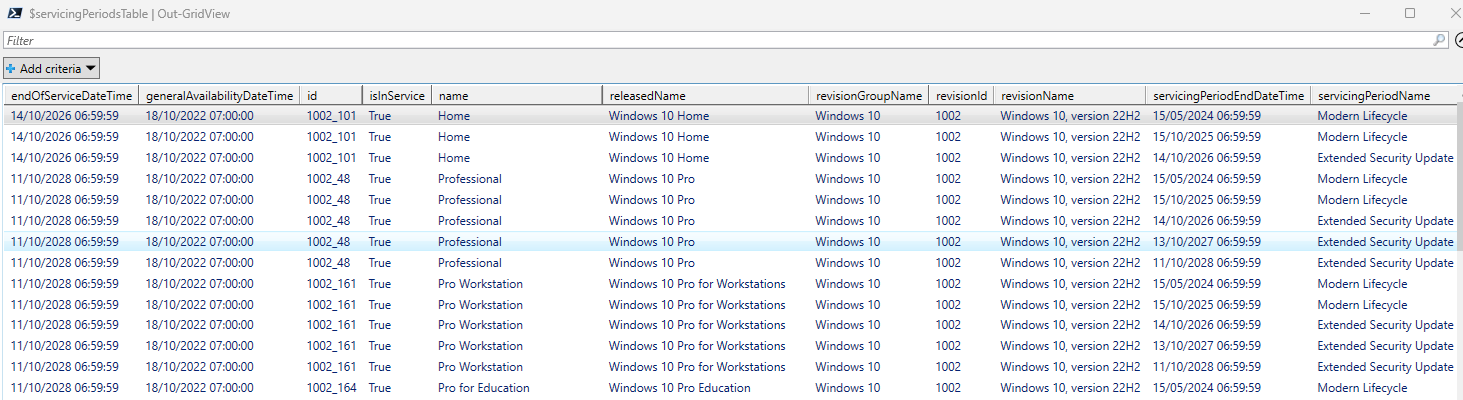
Servicing Periods Table
Stored in the variables $ServicingPeriodsList and $ServicingPeriodTables. Contains a list of Windows editions and the start and end dates of the servicing periods for those editions.
Editions Table
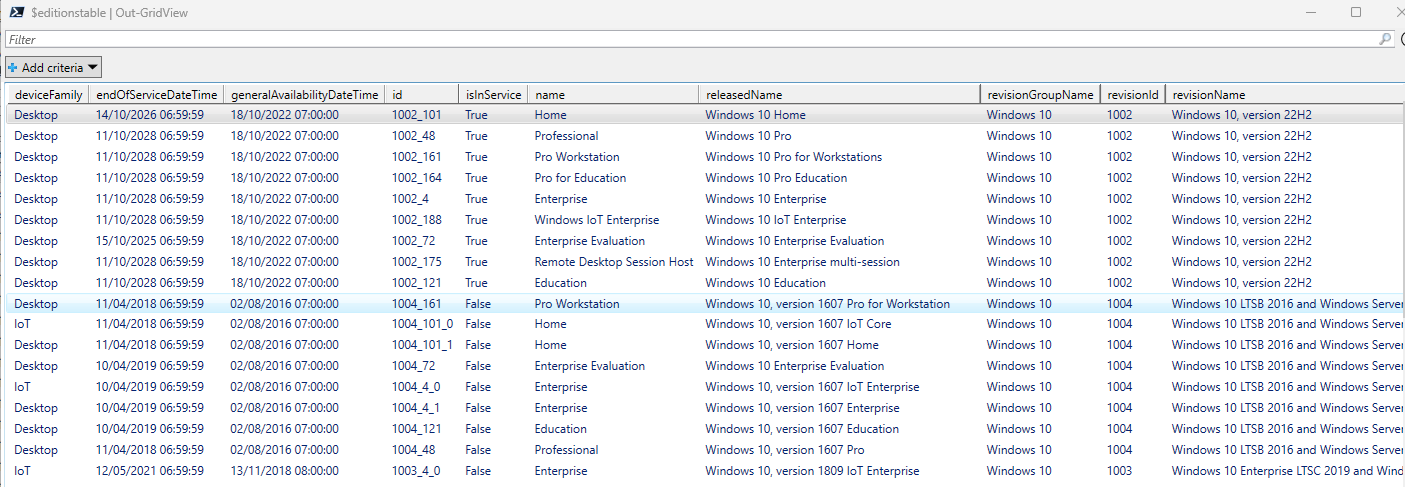
Stored in the variables $EditionsList and $EditionsTable. Contains a list of Windows versions and editions.
Known Issues Table
Stored in the variables $KnownIssueList and $KnownIssueTable. Contains similar info available in the release health pages for Windows versions, such as Windows 11, version 24H2 known issues and notifications, with issue descriptions, details, latest update date, issue status, KB, applicable versions etc.

Interestingly, although this data is undoubtedly useful, for my own reporting solution I decided to continue using data scraped from MS web pages since I found it more complete and also significantly quicker to obtain the information.
Having an API to obtain this data though is a great improvement from MS and a step in the right direction at least. If Microsoft could include data for out-of-support versions in the API as well, this could be icing on the cake.
Here’s the script I used:
| ## ########################################################################################### | |
| ## Azure Automation Runbook to retrieve Windows Update Catalog entries from Microsoft Graph ## | |
| ############################################################################################## | |
| #region ————————————- Permissions ————————————- | |
| # This runbook requires the following permissions: | |
| # Delegated permissions: | |
| # – WindowsUpdates.ReadWrite.All | |
| # – Member of the'Intune Administrator' or 'Windows Update Deployment Administrator' Entra role | |
| # Application permissions: | |
| # – WindowsUpdates.ReadWrite.All | |
| #endregion ———————————————————————————— | |
| #region ————————————- Parameters ————————————– | |
| $ProgressPreference = 'SilentlyContinue' | |
| #endregion ———————————————————————————— | |
| #region ————————————- Functions ————————————— | |
| Function script:Invoke-WebRequestPro { | |
| Param ($URL,$Headers,$Method) | |
| try | |
| { | |
| $WebRequest = Invoke-WebRequest -Uri $URL -Method $Method -Headers $Headers -UseBasicParsing | |
| } | |
| catch | |
| { | |
| $Response = $_ | |
| $WebRequest = [PSCustomObject]@{ | |
| Message = $response.Exception.Message | |
| StatusCode = $response.Exception.Response.StatusCode | |
| StatusDescription = $response.Exception.Response.StatusDescription | |
| } | |
| } | |
| Return $WebRequest | |
| } | |
| # Function to get all entries in the catalog | |
| Function Get-WUCatalogEntries { | |
| [CmdletBinding()] | |
| param( | |
| [Parameter(Mandatory=$true)] | |
| [ValidateSet('Quality','Feature','Driver')] | |
| [string]$filter | |
| ) | |
| switch ($filter) { | |
| Quality { $filterstring = 'microsoft.graph.windowsUpdates.qualityUpdateCatalogEntry' } | |
| Feature { $filterstring = 'microsoft.graph.windowsUpdates.featureUpdateCatalogEntry' } | |
| # Driver { $filterstring = 'microsoft.graph.windowsUpdates.driverUpdateCatalogEntry' } # doesn't work yet | |
| } | |
| $URL = "https://graph.microsoft.com/beta/admin/windows/updates/catalog/entries?`$filter=isof('$filterstring')" | |
| $headers = @{'Authorization'="Bearer " + $GraphToken} | |
| $GraphRequest = Invoke-WebRequestPro -URL $URL -Headers $headers -Method GET | |
| return $GraphRequest | |
| } | |
| # Function to get a specific entry in the catalog | |
| Function Get-WUCatalogEntry { | |
| [CmdletBinding()] | |
| param( | |
| [Parameter(Mandatory=$true)] | |
| [string]$id | |
| ) | |
| $URL = "https://graph.microsoft.com/beta/admin/windows/updates/products/FindByCatalogId(catalogID='$id')?expand=revisions(`$expand=knowledgeBaseArticle),knownIssues(`$expand=originatingKnowledgeBaseArticle,resolvingKnowledgeBaseArticle)" | |
| $headers = @{'Authorization'="Bearer " + $GraphToken} | |
| $GraphRequest = Invoke-WebRequestPro -URL $URL -Headers $headers -Method GET | |
| return $GraphRequest | |
| } | |
| # Function to get Windows Product Editions | |
| Function Get-WindowsProductEditions { | |
| $URL = "https://graph.microsoft.com/beta/admin/windows/updates/products?expand=editions" | |
| $headers = @{'Authorization'="Bearer " + $GraphToken} | |
| $GraphRequest = Invoke-WebRequestPro -URL $URL -Headers $headers -Method GET | |
| return $GraphRequest | |
| } | |
| #endregion ———————————————————————————— | |
| #region ————————————- Authentication ———————————- | |
| # For testing | |
| $script:GraphToken = Get-EntraAccessToken # https://gist.github.com/SMSAgentSoftware/e0737d683d4301767362c2a9587fd09e | |
| # Managed identity authentication | |
| #$null = Connect-AzAccount -Identity | |
| #$script:GraphToken = (Get-AzAccessToken -ResourceTypeName MSGraph -AsSecureString -ErrorAction Stop).Token | ConvertFrom-SecureString -AsPlainText | |
| #endregion ———————————————————————————— | |
| #region ————————————- Quality Updates ——————————— | |
| Write-Output "Retrieving Quality Update Catalog Entries…" | |
| $CatalogEntries = Get-WUCatalogEntries -filter Quality | |
| if ($CatalogEntries.StatusCode -ne 200) { | |
| Write-Error "Error retrieving catalog: $($CatalogEntries.StatusCode) $($CatalogEntries.StatusDescription)" | |
| return | |
| } | |
| $Catalog = ($CatalogEntries.Content | ConvertFrom-Json).value | |
| if ($Catalog.Count -eq 0) { | |
| Write-Error "No catalog entries found." | |
| return | |
| } | |
| # List containers | |
| $CatalogList = [System.Collections.Generic.List[PSCustomObject]]::new() | |
| $RevisionList = [System.Collections.Generic.List[PSCustomObject]]::new() | |
| $KnownIssueList = [System.Collections.Generic.List[PSCustomObject]]::new() | |
| # Process each catalog entry | |
| Write-Output "Processing Quality Update Catalog Entries…" | |
| foreach ($entry in $Catalog) { | |
| # Add to the CatalogList | |
| $CatalogList.Add($entry) | |
| if ($entry.qualityUpdateCadence -ne "unknownFutureValue") # items with an 'unknownFutureValue' have no revisions | |
| { | |
| # Get the individual catalog entry | |
| $UpdateResponse = Get-WUCatalogEntry -id $entry.Id | |
| if ($UpdateResponse.StatusCode -ne 200) { | |
| Write-Error "Error retrieving catalog entry for '$($entry.displayName)': $($UpdateResponse.StatusCode) $($UpdateResponse.StatusDescription)" | |
| continue | |
| } | |
| $Update = ($UpdateResponse.Content | ConvertFrom-Json).value | |
| # Process each update | |
| foreach ($item in $Update) | |
| { | |
| if ($item.name -notmatch "Server") | |
| { | |
| # Extract the revisions | |
| [array]$revisions = $item.revisions | |
| foreach ($revision in $revisions) | |
| { | |
| $RevisionObject = [PSCustomObject]@{ | |
| catalogUpdateId = $entry.id | |
| revisionId = $item.id | |
| revisionName = $item.name | |
| revisionGroupName = $item.groupName | |
| fullBuildNumber = $revision.id | |
| displayName = $revision.displayName | |
| releaseDateTime = $revision.releaseDateTime | |
| isHotPatchUpdate = $revision.isHotPatchUpdate | |
| version = $revision.version | |
| product = $revision.product | |
| buildNumber = $revision.osBuild.buildNumber | |
| updateBuildRevision = $revision.osBuild.updateBuildRevision | |
| knowledgeBaseArticleId = $revision.knowledgeBaseArticle.id | |
| knowledgeBaseArticleUrl = $revision.knowledgeBaseArticle.Url | |
| } | |
| $RevisionList.Add($RevisionObject) | |
| } | |
| # Extract the known issues | |
| [array]$knownIssues = $item.knownIssues | |
| foreach ($knownIssue in $knownIssues) | |
| { | |
| $KnownIssueObject = [PSCustomObject]@{ | |
| revisionId = $item.id | |
| revisionName = $item.name | |
| revisionGroupName = $item.groupName | |
| id = $knownIssue.id | |
| status = $knownIssue.status | |
| webViewUrl = $knownIssue.webViewUrl | |
| description = $knownIssue.description | |
| startDateTime = $knownIssue.startDateTime | |
| title = $knownIssue.title | |
| resolvedDateTime = $knownIssue.resolvedDateTime | |
| lastUpdatedDateTime = $knownIssue.lastUpdatedDateTime | |
| safeguardHoldIds = ($knownIssue.safeguardHoldIds -join ",") | |
| latestDetail = ($knownIssue.knownIssueHistories | Sort createdDateTime -Descending | Select -first 1).body.content | |
| originatingKnowledgeBaseArticleId = $knownIssue.originatingKnowledgeBaseArticle.id | |
| resolvingKnowledgeBaseArticleId = $knownIssue.resolvingKnowledgeBaseArticle.id | |
| originatingKnowledgeBaseArticleUrl = $knownIssue.originatingKnowledgeBaseArticle.url | |
| resolvingKnowledgeBaseArticleUrl = $knownIssue.resolvingKnowledgeBaseArticle.url | |
| } | |
| $KnownIssueList.Add($KnownIssueObject) | |
| } | |
| } | |
| } | |
| } | |
| } | |
| #endregion ———————————————————————————— | |
| #region ————————————- Feature Updates ——————————— | |
| Write-Output "Retrieving Feature Update Catalog Entries…" | |
| $Editions = Get-WindowsProductEditions | |
| if ($Editions.StatusCode -ne 200) { | |
| Write-Error "Error retrieving Windows product editions: $($Editions.StatusCode) $($Editions.StatusDescription)" | |
| return | |
| } | |
| $FilteredEditions = ($Editions.Content | ConvertFrom-Json).value | where {$_.groupName -notmatch "Server" -and $_.groupName -ne "Previous versions"} | |
| # List containers | |
| $EditionsList = [System.Collections.Generic.List[PSCustomObject]]::new() | |
| $ServicingPeriodsList = [System.Collections.Generic.List[PSCustomObject]]::new() | |
| Write-Output "Processing Feature Update Catalog Entries…" | |
| # Process each feature update | |
| foreach ($item in $FilteredEditions) | |
| { | |
| # Extract the editions | |
| [array]$editions = $item.editions | |
| foreach ($edition in ($editions | where {$_.name -notmatch "Server"})) | |
| { | |
| $EditionObject = [PSCustomObject]@{ | |
| revisionId = $item.id | |
| revisionName = $item.name | |
| revisionGroupName = $item.groupName | |
| id = $edition.id | |
| name = $edition.name | |
| releasedName = $edition.releasedName | |
| deviceFamily = $edition.deviceFamily | |
| isInService = $edition.isInService | |
| generalAvailabilityDateTime = $edition.generalAvailabilityDateTime | |
| endOfServiceDateTime = $edition.endOfServiceDateTime | |
| } | |
| $EditionsList.Add($EditionObject) | |
| # Extract the servicing periods into a separate list | |
| [array]$servicingPeriods = $edition.servicingPeriods | |
| foreach ($servicingPeriod in $servicingPeriods) | |
| { | |
| $ServicingPeriodsObject = [PSCustomObject]@{ | |
| revisionId = $item.id | |
| revisionName = $item.name | |
| revisionGroupName = $item.groupName | |
| id = $edition.id | |
| name = $edition.name | |
| releasedName = $edition.releasedName | |
| deviceFamily = $edition.deviceFamily | |
| isInService = $edition.isInService | |
| generalAvailabilityDateTime = $edition.generalAvailabilityDateTime | |
| endOfServiceDateTime = $edition.endOfServiceDateTime | |
| servicingPeriodName = $servicingPeriod.name | |
| servicingPeriodStartDateTime = $servicingPeriod.startDateTime | |
| servicingPeriodEndDateTime = $servicingPeriod.endDateTime | |
| } | |
| $ServicingPeriodsList.Add($ServicingPeriodsObject) | |
| } | |
| } | |
| } | |
| #endregion ———————————————————————————— | |
| #region ————————————- Output Tables ———————————– | |
| # Prepare datatables. This is optional and makes it easier to import into SQL server database | |
| $CatalogTable = [System.Data.DataTable]::new() | |
| $RevisionTable = [System.Data.DataTable]::new() | |
| $KnownIssueTable = [System.Data.DataTable]::new() | |
| $EditionsTable = [System.Data.DataTable]::new() | |
| $ServicingPeriodsTable = [System.Data.DataTable]::new() | |
| # Catalog list | |
| $CatalogList = $CatalogList | Select id,displayName,releaseDateTime,isExpeditable,qualityUpdateClassification,shortName,qualityUpdateCadence | |
| $CatalogList | | |
| Get-Member -MemberType NoteProperty | | |
| ForEach-Object { | |
| if ($_.Name -in ("releaseDateTime")) | |
| { | |
| [void]$CatalogTable.Columns.Add($_.Name,[DateTime]) | |
| } | |
| else | |
| { | |
| [void]$CatalogTable.Columns.Add($_.Name,[System.String]) | |
| } | |
| } | |
| foreach ($item in $CatalogList) { | |
| $row = $CatalogTable.NewRow() | |
| foreach ($col in $CatalogTable.Columns) | |
| { | |
| $entry = $item.$($col.ColumnName) | |
| if ($null -eq $entry) | |
| { | |
| $row[$col.ColumnName] = [System.DBNull]::Value | |
| } | |
| else | |
| { | |
| $row[$col.ColumnName] = $entry | |
| } | |
| } | |
| [void]$CatalogTable.Rows.Add($row) | |
| } | |
| # Revision list | |
| $RevisionList | | |
| Get-Member -MemberType NoteProperty | | |
| ForEach-Object { | |
| if ($_.Name -in ("releaseDateTime")) | |
| { | |
| [void]$RevisionTable.Columns.Add($_.Name,[DateTime]) | |
| } | |
| else | |
| { | |
| [void]$RevisionTable.Columns.Add($_.Name,[System.String]) | |
| } | |
| } | |
| foreach ($item in $RevisionList) { | |
| $row = $RevisionTable.NewRow() | |
| foreach ($col in $RevisionTable.Columns) | |
| { | |
| $entry = $item.$($col.ColumnName) | |
| if ($null -eq $entry) | |
| { | |
| $row[$col.ColumnName] = [System.DBNull]::Value | |
| } | |
| else | |
| { | |
| $row[$col.ColumnName] = $entry | |
| } | |
| } | |
| [void]$RevisionTable.Rows.Add($row) | |
| } | |
| # Known issue list | |
| $KnownIssueList | | |
| Get-Member -MemberType NoteProperty | | |
| ForEach-Object { | |
| if ($_.Name -in ("startDateTime","resolvedDateTime","lastUpdatedDateTime")) | |
| { | |
| [void]$KnownIssueTable.Columns.Add($_.Name,[DateTime]) | |
| } | |
| else | |
| { | |
| [void]$KnownIssueTable.Columns.Add($_.Name,[System.String]) | |
| } | |
| } | |
| foreach ($item in $KnownIssueList) { | |
| $row = $KnownIssueTable.NewRow() | |
| foreach ($col in $KnownIssueTable.Columns) | |
| { | |
| $entry = $item.$($col.ColumnName) | |
| if ($null -eq $entry) | |
| { | |
| $row[$col.ColumnName] = [System.DBNull]::Value | |
| } | |
| else | |
| { | |
| $row[$col.ColumnName] = $entry | |
| } | |
| } | |
| [void]$KnownIssueTable.Rows.Add($row) | |
| } | |
| # Editions list | |
| $EditionsList | | |
| Get-Member -MemberType NoteProperty | | |
| ForEach-Object { | |
| if ($_.Name -in ("generalAvailabilityDateTime","endOfServiceDateTime")) | |
| { | |
| [void]$EditionsTable.Columns.Add($_.Name,[DateTime]) | |
| } | |
| else | |
| { | |
| [void]$EditionsTable.Columns.Add($_.Name,[System.String]) | |
| } | |
| } | |
| foreach ($item in $EditionsList) { | |
| $row = $EditionsTable.NewRow() | |
| foreach ($col in $EditionsTable.Columns) | |
| { | |
| $entry = $item.$($col.ColumnName) | |
| if ($null -eq $entry) | |
| { | |
| $row[$col.ColumnName] = [System.DBNull]::Value | |
| } | |
| else | |
| { | |
| $row[$col.ColumnName] = $entry | |
| } | |
| } | |
| [void]$EditionsTable.Rows.Add($row) | |
| } | |
| # Servicing periods list | |
| $ServicingPeriodsList | | |
| Get-Member -MemberType NoteProperty | | |
| ForEach-Object { | |
| if ($_.Name -in ("generalAvailabilityDateTime","endOfServiceDateTime","servicingPeriodStartDateTime","servicingPeriodEndDateTime")) | |
| { | |
| [void]$ServicingPeriodsTable.Columns.Add($_.Name,[DateTime]) | |
| } | |
| else | |
| { | |
| [void]$ServicingPeriodsTable.Columns.Add($_.Name,[System.String]) | |
| } | |
| } | |
| foreach ($item in $ServicingPeriodsList) { | |
| $row = $ServicingPeriodsTable.NewRow() | |
| foreach ($col in $ServicingPeriodsTable.Columns) | |
| { | |
| $entry = $item.$($col.ColumnName) | |
| if ($null -eq $entry) | |
| { | |
| $row[$col.ColumnName] = [System.DBNull]::Value | |
| } | |
| else | |
| { | |
| $row[$col.ColumnName] = $entry | |
| } | |
| } | |
| [void]$ServicingPeriodsTable.Rows.Add($row) | |
| } | |
| #endregion ———————————————————————————— |
