
- Introduction
- AI Model TESTS
- Conclusion
Introduction
Whilst having access to several different AI models is a cool thing, some models are definitely better than others at dealing with PowerShell code. That being said, testing and rating AI models objectively is a challenging thing. There are several factors to consider such as:
- Quality of response: How well does a model understand what you are asking it, how thoroughly does it reason over the response, and how accurate is the response it produces?
- Cost: How expensive is the model to use via its API?
- Speed: How long does the model take to generate a response?
- Knowledge cut off date: All models are trained on a set of data up to a point in time. The more recent the cut off date, the more up-to-date its knowledge. Models with an older cut off date can’t provide accurate responses if the data has since changed (PowerShell module versions and cmdlet changes are a good example).
There is a website artificialanalysis.ai that seems to do a reasonable job of rating various models, including their coding capability. Some of the models available in our AI assistant are there for review, and below is their coding ranking as of Jan 2025.

However, these ratings are for coding generally and not for PowerShell specifically. So I set out to run a number of tests against 15 different AI models currently available and rate them specifically on their ability to work with PowerShell code.
I have to be honest – the results sometimes surprised me. Some models would perform well at one task, only to fail miserably at another! I selected 5 specific tasks to test each model on:
- The ability to generate a simple function that solves a specific logic problem
- The ability to create an advanced function with more complex requirements
- The ability to convert text output to an ordered PowerShell object
- The ability to debug PowerShell code
- The ability to improve poorly written PowerShell code
I tested the following 15 AI models:
- [OpenAI] o1-mini
- [OpenAI] o1-preview
- [OpenAI] chatgpt-4o
- [OpenAI] gpt-4o
- [OpenAI] gpt-4o-mini
- [Anthropic] claude-3.5-haiku
- [Anthropic] claude-3.5-sonnet
- [Google] gemini-1.5-flash
- [Google] gemini-1.5-pro
- [Google] gemini-2.0-flash-experimental
- [X AI] grok-2
- [X AI] grok-beta
- [PerplexityAI] llama-3.1-sonar-huge-128k-online
- [PerplexityAI] llama-3.1-sonar-large-128k-online
- [PerplexityAI] llama-3.1-sonar-small-128k-online
I rated each model for cost, speed and quality of response – the last one being typically split between accuracy, quality and level of detail in the explanation.
Let’s look at the results.
AI Model TESTS
TEST 1: Generate a simple function that solves a specific logic problem
Prompt:
Create a simple PowerShell function to return the second Tuesday of any given month
Patch Tuesday (or is it Wednesday?!) is a thing, so I asked the AI models to create a simple function that can return the second Tuesday of any given month. Interestingly, the responses were varied with different models using different logic to solve the problem, and 3 of the models failed to provide working code.
Results:

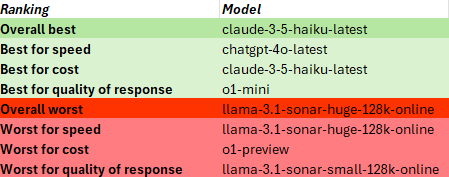
Based on these results, I created rankings below. Here is a brief explanation of the rankings:
- Overall best indicates that the response was the best combination of speed, cost and quality of response
- Best for speed indicates the best response in the quickest time
- Best for cost means the best response for the lowest cost
- Best for quality of response means the best response regardless of speed or cost
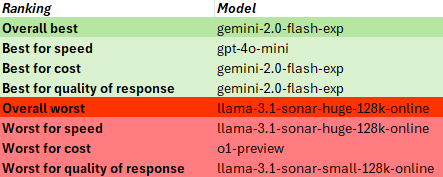
In this case, the gemini-2.0-flash experimental model stood out for it’s good logic, validation of input and good explanation.
Something interesting to note from the results is that different AI model providers appear to use different methods of tokenization. Somehow I assumed that to be standard, but the number of input tokens was calculated differently between providers, and since API usage is charged based on token use, this can affect the cost.
TEST 2: Create an advanced function with more complex requirements
Prompt:
Create an advanced PowerShell function to retrieve a list of managed devices from Microsoft Intune using Microsoft Graph. Do not use any external modules. Use interactive authentication using the auth code flow and use the Graph REST API. Use pagination to retrieve the full list of devices. Include comment-based help, parameter validations and a detailed explanation of the code.
This was a detailed prompt with specific requirements that would require the AI model to return a list of managed devices from Microsoft Intune via the REST API.
It was evident from the responses that this was a more complex task and would really prove the knowledge and reasoning abilities of the model. I actually have working code for this task and I knew what needed to be done, so it was interesting to review all the responses.
Most all of the responses required a tweak or two to get the code working, in particular most did not understand that when you include a variable in a string, such as in a URL string, you need a backtick at the end of the variable to separate it from the rest of the URL. For example:
"$authURL?$authtoken"
will generate an error unless you add a backtick:
"$authURL`?$authtoken"
This was a simple oversight that prevented working code in several cases.
To get the access token, some responses required copying the auth code from the browser URL and pasting it into the PowerShell console, which isn’t a good experience. Only a few were clever enough to use an http listener to obtain the auth code without interaction, yet for some I had to manually assign an available port.
Some models used an incorrect permission scope for Microsoft Graph and some misinterpreted ‘managed devices in Microsoft Intune’ to mean ‘devices in Microsoft Entra’.
Only two of the models implemented PKCE for best security in the auth flow – o1-mini and claude-3.5-sonnet, so extra points for them.
Anyway, here were the results:

The sonar-huge model was so slow it timed out!
In this test, claude-3.5-haiku came out as the overall best, but the best quality of response was from o1-mini.
TEST 3: Convert text output to an ordered PowerShell object
Prompt:
Convert the output of the command ‘dsregcmd /status’ into an ordered PowerShell object.
The results of this test fascinated me. What I thought would be something relatively simple proved to be too much for most of the AI models! The main problem was in generating the correct regex to detect the header sections in the output, for example:
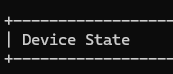
Only 1 model was able to do this correctly – o1-preview. The other models that produced working code didn’t try to group by sections, just return the key value pairs.
In spite of the o1-preview model being able to do this, it made an embarrassing attempt to convert an ordered hashtable into a PSObject – something that can be done with a simple cast!
Here are the results of this test:
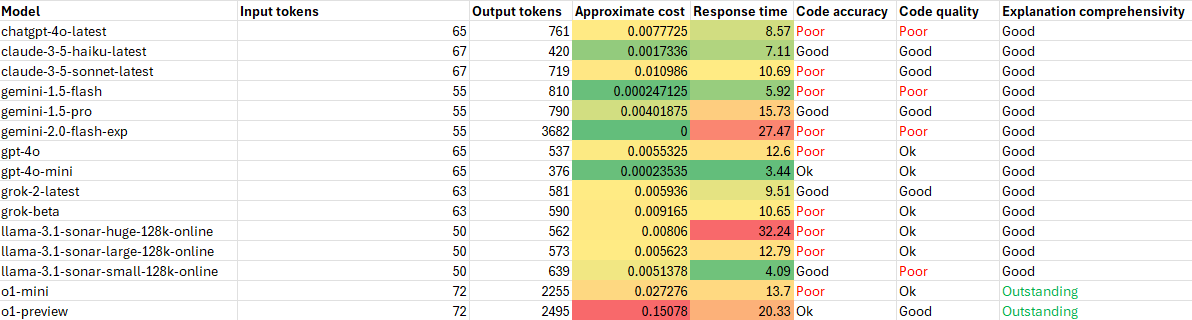
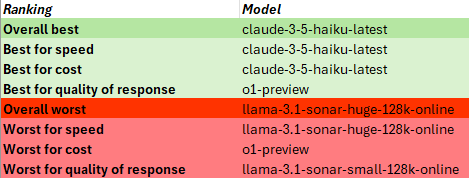
For this test claude-3.5-haiku came out as the overall best again, while the best response award goes to o1-preview as the only model that could do the job (almost) properly.
TEST 4: Debug PowerShell code
Prompt:
The code in the attached file contains errors and inconsistencies. Can you detect and correct them?
The goal of this test was to provide a piece of code that had errors and shortcomings and see how well the AI model could detect and correct those.
The code provided was as follows:
function Get-LargeFiles {
    param (
        [Parameter(Mandatory)]
        [string]$Path,
        [int]$FileSizeKB = 1024
    )
    # Validate the path exists
    if (-not (Test-Path $Path)) {
        Write-Error "The specified path '$Path' does not exist."
        return
    }
    # Get files larger than the specified size
    Get-ChildItem -Path $Path -Recurse -File | Where-Object {
        $_.Length -gt $FileSizeKB * 1000
    } | Select-Object Name, FullName, @{Name="SizeKB"; Expression={($_.Length / 1024)}}
}
I was looking for the following corrections to be made:
- Missing Mandatory Parameter Validation. Although $Path is marked as Mandatory, it does not properly enforce user input because there’s no [CmdletBinding()] or Begin block logic to prompt the user when $Path is missing.
- File Size Calculation. The file size comparison uses $_.Length -gt $FileSizeKB * 1000, which multiplies the FileSizeKB parameter by 1000 instead of 1024, leading to an incorrect file size comparison.
- Error Behavior on Non-Directory Path. If $Path points to a file instead of a directory, Get-ChildItem -Recurse throws an error, as it expects a directory. This edge case isn’t handled.
- Formatting of the Size Output. The size in KB in the output table is rounded inconsistently because no formatting is applied.
In this test, only 2 models corrected all of the issues – claude-3.5-sonnet and o1-mini, both of which went even further and added full parameter validation, and the o1-mini model even understanding that the file size in KB could potentially be greater than the maximum value for an integer and changing it to a long. The other models corrected either 0,1,2 or 3 of the issues. 2 models incorrectly detected another issue which actually wasn’t there. The gemini-2.0-flash experimental model was the only model that kindly added comment-based help, which wasn’t asked for but was a nice touch.
Here are the results:
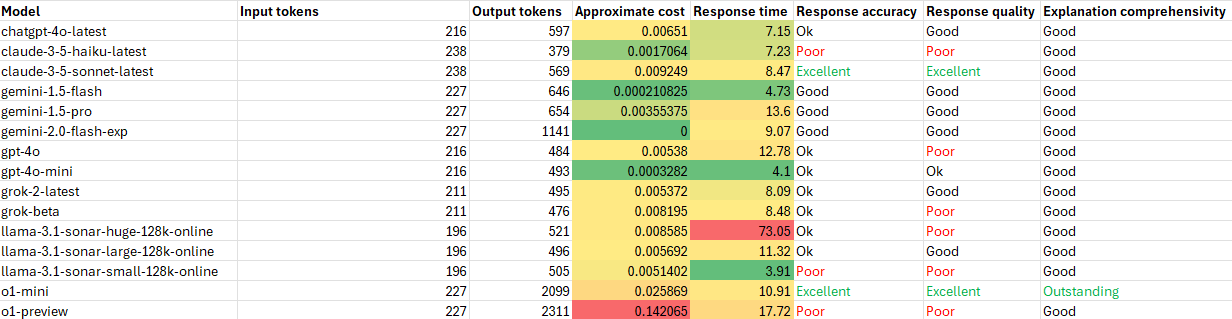
In this case, the surprising overall winner was gemini-1.5-flash with o1-mini again taking the award for best quality of response.
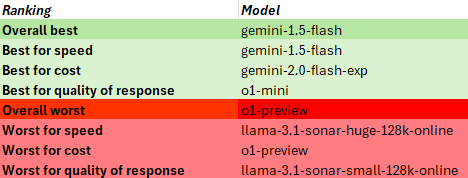
I was also quite surprised that o1-preview, a previous winner for best quality of response, had a bad day at the races on this one!
TEST 5: Improve poorly written PowerShell code
Prompt:
The code in the attached file is poorly written. Please improve the logic, efficiency and readability of this script and remove any redundant code.
For this last test I provided the following code and asked to turn it into something less cringe-worthy.
# This script queries Microsoft Graph for a list of Entra ID users
$tokenResponse = az account get-access-token --resource https://graph.microsoft.com
$token = $tokenResponse | ConvertFrom-Json | Select-Object -ExpandProperty accessToken
if (-not $token) {
    Write-Host "Failed to retrieve access token."
    exit
}
$url = "https://graph.microsoft.com/v1.0/users"
$response = Invoke-RestMethod -Uri $url -Headers @{ "Authorization" = "Bearer $token" }
if ($response -eq $null) {
    Write-Host "No users found."
} else {
    Write-Host "Users:"
    foreach ($user in $response.value) {
        Write-Host $user.displayName
    }
    Write-Host "Emails:"
    foreach ($user in $response.value) {
        Write-Host $user.mail
    }
}
$url2 = "https://graph.microsoft.com/v1.0/me"
$response2 = Invoke-RestMethod -Uri $url2 -Headers @{ "Authorization" = "Bearer $token" }
Write-Host "Logged-in user information: $response2"
In particular, I was looking for the following improvements:
- Modularize the code into functions
- Add error handling
- Merge the foreach loop on the results
- Add comments
- Select only specific properties in the REST API call
- Add pagination
Unfortunately, not one single model made all those improvements, but some did come close, with the claude-3.5-sonnet and o1-mini models again standing out for quality of response. o1-mini was the only model that included pagination, although it provided the code only as a suggestion. Only 3 models allowed the selection of specific properties in the REST API call (this makes the web request more efficient) – gemini-1.5-pro and the large and small sonar models. Overall, most of the models actually did ok in the improvements they suggested.
These were the results:

For this test, gemini-2.0-flash experimental again took the podium for overall best, and o1-mini again wins for best quality of response.

Summary
Picking overall winners and losers is difficult, but based on these results of these tests alone I would pick the following:
| Category | Description | Model/s |
|---|---|---|
| Overall best | Best combination of speed, cost and quality of response | gemini-2.0-flash-exp & claude-3-5-haiku-latest |
| Best quality of response | Demonstrated the highest level of understanding and produced the best response and code output. | 1. o1-mini 2. o1-preview 3. claude-3.5-sonnet |
| Best explanations | Provided the most comprehensive explanation of the code | 1. o1-mini 2. o1-preview 3. gemini-2.0-flash-exp |
| Overall worst | Worst combination of speed, cost and quality of response | llama-3.1-sonar-huge-128k-online |
Let’s quickly review each of the models grouped by their providers:
OpenAI
o1-mini outperformed most models for most things, but not always. It would be my model of choice if I want the best response. However, it is expensive and you will pay for the privilege, and it also slower as it takes more time to reason over the prompt.
o1-preview also provided some good responses, but again not always. It is VERY expensive though compared to all the other models, which means I am much more likely to use the o1-mini instead.
The other gpt models performed fairly, but none were outstanding. gpt-4o-mini is a bargain for its price.
Anthropic
Claude-3.5-sonnet isn’t so far behind the o1 models in its depth of understanding and provided some great responses, but still had its inaccuracies.
Claude-3.5-haiku is more attractive by price and speed, and sometimes responded better than its big brother, but doesn’t show the same depth of understanding in more complex tasks.
The Gemini models were a surprise. The 2.0 experimental model performed quite well for most things and as it’s currently free to use makes it a steal. I look forward to seeing what becomes of it.
The 1.5 models aren’t as capable, but their price and speed make them attractive. The flash model actually seemed to perform better across tasks, but the pro model showed greater depth of understanding.
X AI
The Grok models were ok, nothing special, with the cheaper grok-2.0 seeming to outperform the grok-beta. For the quality of responses that they gave I find them overpriced, which is surprising. Since they are owned by the world’s richest man you’d think they’d be priced more competitively.
Perplexity
The sonar-huge and sonar-small online models consistently performed poorly. The small model was too brief and shallow, the huge model way too slow and too expensive. The large model, though, performed fairly, though I find even that to be overpriced. I found that these models tended to think differently than all the other models. They may not be the best for working with PowerShell code, but they do excel at reasoning over current information from the internet, which is really what they should be used for.
Update 2025-01-22: Perplexity just announced the deprecation of their llama sonar models via the API. They have introduced 2 new models – sonar and sonar-pro. I haven’t tested these extensively yet, but initial testing shows that the sonar model seems to be a rebrand of the llama-3.1-sonar-large-128k-online model and is identically priced, whereas the sonar-pro model is definitely an improved and competitive model, showing more depth of understanding and accuracy in its responses making it one of the best currently available – although it is also one of the most expensive to use.
Conclusion
Choosing which AI model to use really depends on your requirements. If cost is no concern and you want the best code and verbose responses, use the o1 models, or claude-3.5-sonnet. However, these tests prove that there is no guarantee any one model will give the best response all of the time, and this proves the usefulness of our multi-model AI assistant since we can prompt many different models. If one model isn’t giving the response we want, try another.
Even though the afore-mentioned models can give a great response, they aren’t cost effective to use for simple queries. They are better for more complex tasks, but for simple questions like ‘What are the supported parameters of the Get-AzAccessToken cmdlet?‘ or ‘What date-time formats can I use in PowerShell?‘ other models will give you a perfectly good response. I personally use the gpt-4o-mini model as my default as most of the time its able to answer my prompts perfectly well and its cheap as chips, but for more advanced code generation I use claude-3.5-sonnet or o1-mini.
In the next post, we’ll walk through a real-world example of using an AI model to generate an original PowerShell script suitable for production use without penning a single line of code ourselves. Stay tuned!
