
For a long time, adding a modern design theme to your WPF project typically meant adding a 3rd party library to provide the styling, such as MahApps Metro, or WPF UI. With the release of .Net 9, a Fluent theme is finally coming to WPF! There are still areas where 3rd party libraries will be preferred for providing additional controls such as flexible datagrids, navigation controls, or dialogs. But its still great to have the Fluent theme native to .Net.
To see what controls and styles are used with the Fluent theme, take a look at the WPF Gallery app.
To enable the Fluent theme in your project, you can either add a resource dictionary to your app or window, or simply just just add the ThemeMode property, where you can specify either Light, Dark, System or None values, eg:

To use the Fluent theme in Visual Studio, you’ll need VS 2022 17.12 or later, with the .Net desktop development workload and the .Net 9 component.
If you like to create WPF apps using PowerShell, you’ll need to install the .Net Desktop Runtime 9. You’ll also need to install PowerShell 7.5 or newer to use .Net 9 libraries (PowerShell 5 / .Net framework is not supported). At the time of writing, there is a release candidate available for PowerShell 7.5 with a view to general availability in January 2025.
Let’s take a brief look at the new styling.
I created a quick sample app to demonstrate. If I run the following code in either PowerShell 5 or 7, I get the simpler WPF styling available prior to .Net 9.

| # Define the xaml code for the window | |
| [xml]$xaml = @' | |
| <Window | |
| xmlns="http://schemas.microsoft.com/winfx/2006/xaml/presentation" | |
| Title="Let's Eat!" | |
| SizeToContent="WidthAndHeight" WindowStartupLocation="CenterScreen" > | |
| <Grid> | |
| <TabControl Margin="5"> | |
| <TabItem> | |
| <TabItem.Header> | |
| <StackPanel Orientation="Horizontal"> | |
| <TextBlock Text="Food" Margin="5" /> | |
| </StackPanel> | |
| </TabItem.Header> | |
| <StackPanel Margin="5" > | |
| <TextBlock Text="Food" FontSize="20" FontWeight="Bold" /> | |
| <TextBlock Text="Food is any substance consumed to provide nutritional support for an organism." /> | |
| <Expander Header="Different types of food" Margin="5" > | |
| <ListView> | |
| <ListViewItem Content="Healthy"/> | |
| <ListViewItem Content="Unhealthy"/> | |
| </ListView> | |
| </Expander> | |
| <StackPanel Orientation="Horizontal"> | |
| <Label Content="Click on a food item to know more" /> | |
| </StackPanel> | |
| <StackPanel Orientation="Horizontal"> | |
| <Button Name="Eggs" Content="Eggs" Margin="5"/> | |
| <Button Name="Butter" Content="Butter" Margin="5"/> | |
| <Button Name="Rice" Content="Rice" Margin="5"/> | |
| <Button Name="Beans" Content="Beans" Margin="5"/> | |
| </StackPanel> | |
| <Slider Width="480" Margin="5" HorizontalAlignment="Left" VerticalAlignment="Center" Maximum="100" Minimum="0"/> | |
| </StackPanel> | |
| </TabItem> | |
| <TabItem > | |
| <TabItem.Header> | |
| <StackPanel Orientation="Horizontal"> | |
| <TextBlock Text="Drink" Margin="5" /> | |
| </StackPanel> | |
| </TabItem.Header> | |
| <StackPanel Margin="5"> | |
| <TextBlock Text="Drink" FontSize="20" FontWeight="Bold" /> | |
| <TextBlock Text="A drink is a liquid intended for human consumption." /> | |
| </StackPanel> | |
| </TabItem> | |
| </TabControl> | |
| </Grid> | |
| </Window> | |
| '@ | |
| # Load the WPF assembly | |
| Add-Type -AssemblyName PresentationFramework | |
| # Load the window and named elements as variables in a hash table | |
| $UI = [System.Collections.Hashtable]::Synchronized(@{}) | |
| $UI.Window = [System.Windows.Markup.XamlReader]::Load((New-Object -TypeName System.Xml.XmlNodeReader -ArgumentList $xaml)) | |
| $xaml.SelectNodes("//*[@*[contains(translate(name(.),'n','N'),'Name')]]") | | |
| ForEach-Object -Process { | |
| $UI.$($_.Name) = $UI.Window.FindName($_.Name) | |
| } | |
| # Bring window to the fore | |
| $UI.Window.Add_Loaded({ | |
| $This.Activate() | |
| }) | |
| # Add a click event to the Eggs button | |
| $UI.Eggs.Add_Click({ | |
| ## Pop a simple wscript notification | |
| $wshell = New-Object -ComObject Wscript.Shell | |
| $wshell.Popup("Eggs are a good source of protein and other nutrients",0,"Eggs",0x1) | |
| }) | |
| # Show the window | |
| [void]$UI.Window.ShowDialog() |
If I then add the ThemeMode property to the window and set it to “Dark” – and run this in PowerShell 7.5 – I get the new Fluent theme in dark mode automatically applied.

The Fluent theme also supports accent colours, which you would typically access as a dynamic resource, as well as an icon set. After making a few changes to the XAML code, I have some accents applied and icons added.
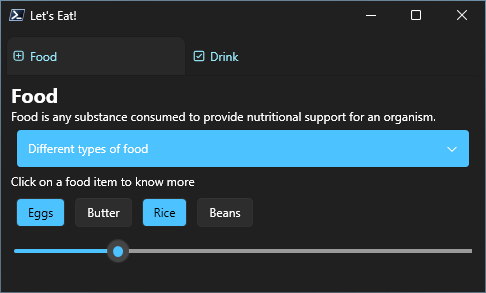
Pretty cool 🙂
| # Define the xaml code for the window | |
| [xml]$xaml = @' | |
| <Window | |
| xmlns="http://schemas.microsoft.com/winfx/2006/xaml/presentation" | |
| Title="Let's Eat!" | |
| ThemeMode="Dark" | |
| SizeToContent="WidthAndHeight" WindowStartupLocation="CenterScreen" > | |
| <Grid> | |
| <TabControl Margin="5"> | |
| <TabItem> | |
| <TabItem.Header> | |
| <StackPanel Orientation="Horizontal"> | |
| <TextBlock FontFamily="{StaticResource SymbolThemeFontFamily}" Text="" VerticalAlignment="Center" Foreground="{DynamicResource AccentTextFillColorPrimaryBrush}"/> | |
| <TextBlock Text="Food" Margin="5" Foreground="{DynamicResource AccentTextFillColorPrimaryBrush}"/> | |
| </StackPanel> | |
| </TabItem.Header> | |
| <StackPanel Margin="5" > | |
| <TextBlock Text="Food" FontSize="20" FontWeight="Bold" /> | |
| <TextBlock Text="Food is any substance consumed to provide nutritional support for an organism." /> | |
| <Expander Header="Different types of food" Margin="5" Background="{DynamicResource AccentTextFillColorTertiaryBrush}"> | |
| <ListView> | |
| <ListViewItem Content="Healthy"/> | |
| <ListViewItem Content="Unhealthy"/> | |
| </ListView> | |
| </Expander> | |
| <StackPanel Orientation="Horizontal" Background="{DynamicResource SolidBackgroundFillColorTeriaryBrush}"> | |
| <Label Content="Click on a food item to know more" Background="{DynamicResource SolidBackgroundFillColorTeriaryBrush}"/> | |
| </StackPanel> | |
| <StackPanel Orientation="Horizontal"> | |
| <Button Name="Eggs" Content="Eggs" Style="{DynamicResource AccentButtonStyle}" Margin="5"/> | |
| <Button Name="Butter" Content="Butter" Margin="5"/> | |
| <Button Name="Rice" Content="Rice" Style="{DynamicResource AccentButtonStyle}" Margin="5"/> | |
| <Button Name="Beans" Content="Beans" Margin="5"/> | |
| </StackPanel> | |
| <Slider Width="500" Margin="3" HorizontalAlignment="Left" VerticalAlignment="Center" Maximum="100" Minimum="0"/> | |
| </StackPanel> | |
| </TabItem> | |
| <TabItem > | |
| <TabItem.Header> | |
| <StackPanel Orientation="Horizontal"> | |
| <TextBlock FontFamily="{StaticResource SymbolThemeFontFamily}" Text="" VerticalAlignment="Center" Foreground="{DynamicResource AccentTextFillColorPrimaryBrush}"/> | |
| <TextBlock Text="Drink" Margin="5" Foreground="{DynamicResource AccentTextFillColorPrimaryBrush}"/> | |
| </StackPanel> | |
| </TabItem.Header> | |
| <StackPanel Margin="5"> | |
| <TextBlock Text="Drink" FontSize="20" FontWeight="Bold" /> | |
| <TextBlock Text="A drink is a liquid intended for human consumption." /> | |
| </StackPanel> | |
| </TabItem> | |
| </TabControl> | |
| </Grid> | |
| </Window> | |
| '@ | |
| # Load the WPF assembly | |
| Add-Type -AssemblyName PresentationFramework | |
| # Load the window and named elements as variables in a hash table | |
| $UI = [System.Collections.Hashtable]::Synchronized(@{}) | |
| $UI.Window = [System.Windows.Markup.XamlReader]::Load((New-Object -TypeName System.Xml.XmlNodeReader -ArgumentList $xaml)) | |
| $xaml.SelectNodes("//*[@*[contains(translate(name(.),'n','N'),'Name')]]") | | |
| ForEach-Object -Process { | |
| $UI.$($_.Name) = $UI.Window.FindName($_.Name) | |
| } | |
| # Bring window to the fore | |
| $UI.Window.Add_Loaded({ | |
| $This.Activate() | |
| }) | |
| # Add a click event to the Eggs button | |
| $UI.Eggs.Add_Click({ | |
| ## Pop a simple wscript notification | |
| $wshell = New-Object -ComObject Wscript.Shell | |
| $wshell.Popup("Eggs are a good source of protein and other nutrients",0,"Eggs",0x1) | |
| }) | |
| # Show the window | |
| [void]$UI.Window.ShowDialog() |
