!! UPDATE 2024-11-12 !!
Microsoft have now documented this safeguard as well as patching it in the December 10, 2024 Windows updates. Read more about it here.
A few days ago I happened to be reviewing our feature update Power BI report and noticed that a number of devices were now being blocked from upgrading to Windows 11 24H2 due to a new safeguard hold with the id 54762729. To date, more than 40% of our estate are now blocked.

If you aren’t familiar with safeguard holds, according to Microsoft:
Safeguard holds prevent a device with a known issue from being offered a new feature update. We use safeguard holds to make sure you have a positive experience as your device moves to a new version of Windows.
The lifespan of safeguard holds varies, and once the originating issue is resolved, the safeguard holds are lifted. You can see documented known issues affecting impacting supported versions of Windows on the Windows release health hub, where you can also learn more about Windows 11 availability and rollout.
This particular block didn’t exist when Windows 11 24H2 was first GA, and I quickly updated my own HP workstation at the time. However, my own workstation is now reporting this block as well, even though it’s already running 24H2 without issue!
After reviewing our inventory solution for software update data, I could see that the block first started being reported late in the day October 31st.

Since there is nothing reported on this block (to date) on Microsoft’s known issues page for Windows 11 24H2, I wanted to find out more about it. I appreciate that MS can’t always publicly disclose information about every safeguard when 3rd parties are involved, but to have so many devices blocked with no further information isn’t cool.
Thanks to the stellar work of community contributors Adam Gross and Gary Blok, I was able to create a database of safeguard holds from parsing the data in Microsoft’s Compatibility Appraiser databases and find more information about this block. It first appeared in database versions 2607, 2674, 2692 and 2715, dated 22:14 on October 31st, which accords with my own reporting.
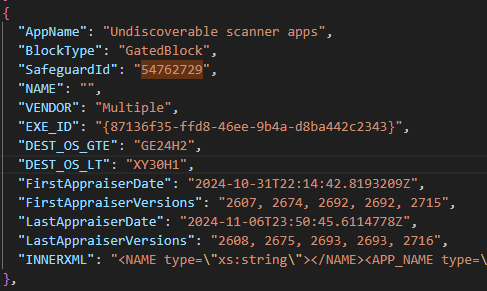
The name of the safeguard is curious: “Undiscoverable scanner apps“. What could that mean exactly?
Within the data for that safeguard I found that it uses the following PowerShell script to determine whether a device is affected by this block:
$Res = 0
$LastVidPid = ''
$UsbDevices = Get-PnpDevice | Sort-Object InstanceId | Where-Object { $_.InstanceId -like '*usb\vid_*' }
Write-Host $UsbDevices.Count, 'USB devices'
foreach ($d in $UsbDevices) {
	$InstParts = $d.InstanceId -split '&'
	if ($InstParts.Count -lt 2) { continue }
	$VidPid = $InstParts[0] + '&' + $InstParts[1]
	if ($VidPid -ne $LastVidPid) {
		# Consider all instances of this VID/PID
		$ThisDevice = $UsbDevices | Where-Object { $_.InstanceId -and $_.InstanceId.Contains($VidPid) }
		$HasPrint = $ThisDevice | Where-Object { $_.CompatibleID -and $_.CompatibleID.Contains('USB\Class_07&SubClass_01&Prot_02') }
		if ($HasPrint) {
			# No need to block an update for device with USB print
			# Do nothing
		}
		else {
			$HasScan = $ThisDevice | Where-Object { $_.CompatibleID -and $_.CompatibleID.Contains('USB\MS_COMP_SCAN') }
			if ($HasScan) {
				Write-Host 'Block update for:', $thisDevice[0].InstanceID
				$Res = 1
				break
			}

			$HasWinUSB = $ThisDevice | Where-Object { $_.CompatibleID -and $_.CompatibleID.Contains('USB\MS_COMP_WINUSB') }
			if ($HasWinUSB) {
					Write-Host 'Block update for (WINUSB):', $thisDevice[0].InstanceID
				$Res = 1
				break
			}
		}
		$LastVidPid = $VidPid
	}
}
Write-Host 'Final result:', $Res
So what is this script doing? Well it looping through all the plug and play USB devices registered in the OS and looking for any devices with a ‘compatible Id’ that contains either of the following:
- ‘USB\MS_COMP_SCAN’
- ‘USB\MS_COMP_WINUSB’
According to Microsoft, a compatible Id is
…a vendor-defined identification string that Windows uses to match a device to a driver package. A compatible ID identifies what a device is to some level of specificity and is indicating that any driver package that declares it can work with a device that has that ID can work with this device for some degree of functionality
If I understand correctly, if a device contains a compatible Id like MS_COMP_*, that device is able to use a generic inbox driver from Microsoft even if no vendor specific drivers are installed.
So what sort of devices are using these compatible Ids?
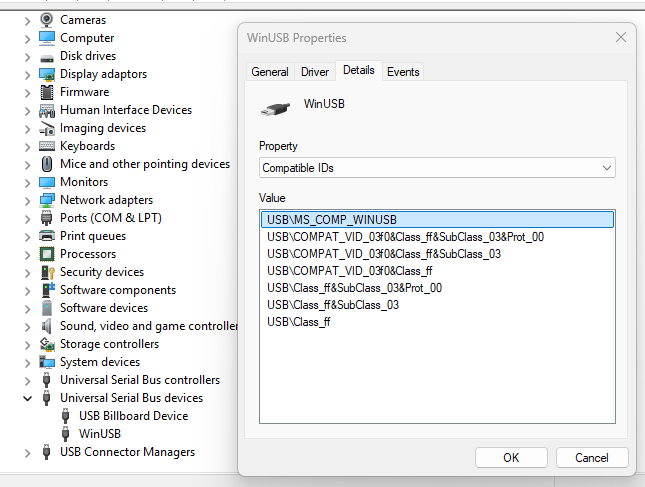
After investigating on my own HP workstation, I found that my Thunderbolt dock registers a device simply called WinUSB with this compatible Id, and sure enough it’s using a generic Microsoft driver.
To find out more, I pushed out the following remediation script in Intune which returns some details about the hardware devices that are triggering this block. Since we’re mostly an HP shop, I included information about any HP docks that might be present where possible.
$BlockingDevicesList = [Collections.Generic.List[PSCustomObject]]::new()
$LastVidPid = ''
$UsbDevices = Get-PnpDevice | Sort-Object InstanceId | Where-Object { $_.InstanceId -like '*usb\vid_*' }
foreach ($d in $UsbDevices)
{
	$InstParts = $d.InstanceId -split '&'
	if ($InstParts.Count -lt 2) { continue }
	$VidPid = $InstParts[0] + '&' + $InstParts[1]
	if ($VidPid -ne $LastVidPid)
    {
		# Consider all instances of this VID/PID
		$ThisDevice = $UsbDevices | Where-Object { $_.InstanceId -and $_.InstanceId.Contains($VidPid) }
		$HasPrint = $ThisDevice | Where-Object { $_.CompatibleID -and $_.CompatibleID.Contains('USB\Class_07&SubClass_01&Prot_02') }
		if ($HasPrint)
        {
			# No need to block an update for device with USB print
			# Do nothing
		}
		else
        {
			$HasScan = $ThisDevice | Where-Object { $_.CompatibleID -and $_.CompatibleID.Contains('USB\MS_COMP_SCAN') }
			if ($HasScan)
            {
                foreach ($Device in $ThisDevice)
                {
                    If ($device.CompatibleID.Contains('USB\MS_COMP_SCAN'))
                    {
                        $BlockingDevicesList.Add([PSCustomObject]@{
                            InstanceID = $Device.InstanceID
                            FriendlyName = $Device.FriendlyName
                            Manufacturer = $Device.Manufacturer
                            Service = $Device.Service
                            PNPClass = $Device.PNPClass
                            Present = $Device.Present
                            CompatibleIDMatch = 'USB\MS_COMP_SCAN'
                        })
                    }
                }
			}

			$HasWinUSB = $ThisDevice | Where-Object { $_.CompatibleID -and $_.CompatibleID.Contains('USB\MS_COMP_WINUSB') }
			if ($HasWinUSB)
            {
                foreach ($Device in $ThisDevice)
                {
                    If ($device.CompatibleID.Contains('USB\MS_COMP_WINUSB'))
                    {
                        $BlockingDevicesList.Add([PSCustomObject]@{
                            InstanceID = $Device.InstanceID
                            FriendlyName = $Device.FriendlyName
                            Manufacturer = $Device.Manufacturer
                            Service = $Device.Service
                            PNPClass = $Device.PNPClass
                            Present = $Device.Present
                            CompatibleIDMatch = 'USB\MS_COMP_WINUSB'
                        })
                    }
                }
			}
		}
		$LastVidPid = $VidPid
	}
}

foreach ($BlockingDevice in $BlockingDevicesList)
{
    if ($BlockingDevice.InstanceId.StartsWith('USB\VID_03F0'))
    {
        $i = Get-Item "HKLM:\SOFTWARE\HP\HP Firmware Installer" -ErrorAction SilentlyContinue
        if ($i)
        {
            $HPDockPortNames = $i.GetSubKeyNames() -join ","
            $BlockingDevice | Add-Member -NotePropertyName "HPDockPortNames" -NotePropertyValue $HPDockPortNames
        }
    }
}

If ($BlockingDevicesList.Count -gt 0)
{
    $BlockingDevicesList | ConvertTo-Json -Compress
}
Else
{
    Write-Host "No blocking devices found"
}
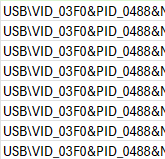
After extracting some of the results that came in using MS Graph, I could see that quite an assortment of devices can trigger this block:

Interestingly, none of the reporting workstations were blocked by a device using the ‘MS_COMP_SCAN’ Id – they were all using ‘MS_COMP_WINUSB’. From the InstanceIDs of the devices I can tell that a majority of these are related to HP docks (we have many of them). The vendor Id (VID) for HP is 03F0 and the PIDs are variations of their USB-C or Thunderbolt docks.
Sadly, in spite of this useful information, at the moment I am still none the wiser as to why these USB devices are triggering a safeguard hold and what exactly the problem might be! It is especially confusing since my upgraded HP workstation and its dock, which would otherwise be blocking the upgrade, are working perfectly fine with 24H2. And none of the devices we have upgraded so far have reported any show-stopping issues.
My instinct tells me this block is perhaps unintentionally (or intentionally?) over-reaching. Blocking for any device that is using a Microsoft compatible USB driver seems a bit extreme to me – like they don’t know exactly what devices may be causing an issue here so they’ve thrown out a catch-all blocker until they narrow down more exactly what is causing a problem. But that’s just a guess at this point.
I will update this post if I find out anything more, but if you have any useful information on this please do leave a comment below!
