|
##################### |
|
## HP BIOS UPDATER ## |
|
##################### |
|
|
|
# Params |
|
$HPIAWebUrl = "https://ftp.hp.com/pub/caps-softpaq/cmit/HPIA.html" # Static web page of the HP Image Assistant |
|
$BIOSPassword = "MyPassword" |
|
$script:ContainerURL = "https://mystorageaccount.blob.core.windows.net/mycontainer" # URL of your Azure blob storage container |
|
$script:FolderPath = "HP_BIOS_Updates" # the subfolder to put logs into in the storage container |
|
$script:SASToken = "mysastoken" # the SAS token string for the container (with write permission) |
|
$ProgressPreference = 'SilentlyContinue' # to speed up web requests |
|
|
|
|
|
################################ |
|
## Create Directory Structure ## |
|
################################ |
|
$RootFolder = $env:ProgramData |
|
$ParentFolderName = "Contoso" |
|
$ChildFolderName = "HP_BIOS_Update" |
|
$ChildFolderName2 = Get-Date -Format "yyyy-MMM-dd_HH.mm.ss" |
|
$script:WorkingDirectory = "$RootFolder\$ParentFolderName\$ChildFolderName\$ChildFolderName2" |
|
try |
|
{ |
|
[void][System.IO.Directory]::CreateDirectory($WorkingDirectory) |
|
} |
|
catch |
|
{ |
|
throw |
|
} |
|
|
|
|
|
# Function write to a log file in ccmtrace format |
|
Function script:Write-Log { |
|
|
|
param ( |
|
[Parameter(Mandatory = $true)] |
|
[string]$Message, |
|
|
|
[Parameter()] |
|
[ValidateSet(1, 2, 3)] # 1-Info, 2-Warning, 3-Error |
|
[int]$LogLevel = 1, |
|
|
|
[Parameter(Mandatory = $true)] |
|
[string]$Component, |
|
|
|
[Parameter(Mandatory = $false)] |
|
[object]$Exception |
|
) |
|
|
|
$LogFile = "$WorkingDirectory\HP_BIOS_Update.log" |
|
|
|
If ($Exception) |
|
{ |
|
[String]$Message = "$Message" + "$Exception" |
|
} |
|
|
|
$TimeGenerated = "$(Get-Date -Format HH:mm:ss).$((Get-Date).Millisecond)+000" |
|
$Line = '<![LOG[{0}]LOG]!><time="{1}" date="{2}" component="{3}" context="" type="{4}" thread="" file="">' |
|
$LineFormat = $Message, $TimeGenerated, (Get-Date -Format MM-dd-yyyy), $Component, $LogLevel |
|
$Line = $Line -f $LineFormat |
|
|
|
# Write to log |
|
Add-Content -Value $Line -Path $LogFile -ErrorAction SilentlyContinue |
|
|
|
} |
|
|
|
|
|
# Function to upload log file to Azure Blob storage |
|
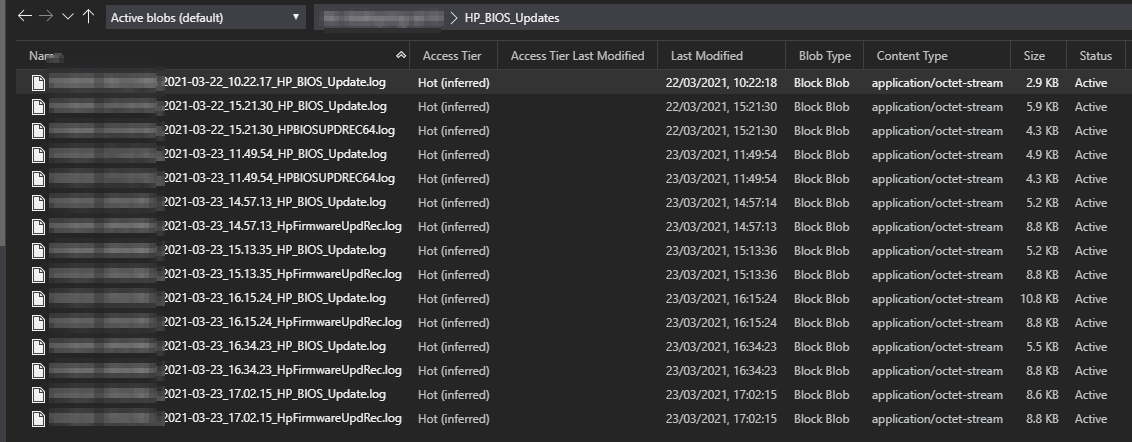
Function Upload-LogFilesToAzure { |
|
$Date = Get-date -Format "yyyy-MM-dd_HH.mm.ss" |
|
$HpFirmwareUpdRecLog = Get-ChildItem -Path $WorkingDirectory -Include HpFirmwareUpdRec.log -Recurse -ErrorAction SilentlyContinue |
|
$HPBIOSUPDRECLog = Get-ChildItem -Path $WorkingDirectory -Include HPBIOSUPDREC64.log -Recurse -ErrorAction SilentlyContinue |
|
If ($HpFirmwareUpdRecLog) |
|
{ |
|
$File = $HpFirmwareUpdRecLog |
|
} |
|
ElseIf ($HPBIOSUPDRECLog) |
|
{ |
|
$File = $HPBIOSUPDRECLog |
|
} |
|
Else{} |
|
If ($File) |
|
{ |
|
$Body = Get-Content $($File.FullName) -Raw -ErrorAction SilentlyContinue |
|
If ($Body) |
|
{ |
|
$URI = "$ContainerURL/$FolderPath/$($Env:COMPUTERNAME)`_$Date`_$($File.Name)$SASToken" |
|
$Headers = @{ |
|
'x-ms-content-length' = $($File.Length) |
|
'x-ms-blob-type' = 'BlockBlob' |
|
} |
|
Invoke-WebRequest -Uri $URI -Method PUT -Headers $Headers -Body $Body -ErrorAction SilentlyContinue |
|
} |
|
} |
|
$File2 = Get-Item $WorkingDirectory\HP_BIOS_Update.log -ErrorAction SilentlyContinue |
|
$Body2 = Get-Content $($File2.FullName) -Raw -ErrorAction SilentlyContinue |
|
If ($Body2) |
|
{ |
|
$URI2 = "$ContainerURL/$FolderPath/$($Env:COMPUTERNAME)`_$Date`_$($File2.Name)$SASToken" |
|
$Headers2 = @{ |
|
'x-ms-content-length' = $($File2.Length) |
|
'x-ms-blob-type' = 'BlockBlob' |
|
} |
|
Invoke-WebRequest -Uri $URI2 -Method PUT -Headers $Headers2 -Body $Body2 -ErrorAction SilentlyContinue |
|
} |
|
} |
|
|
|
|
|
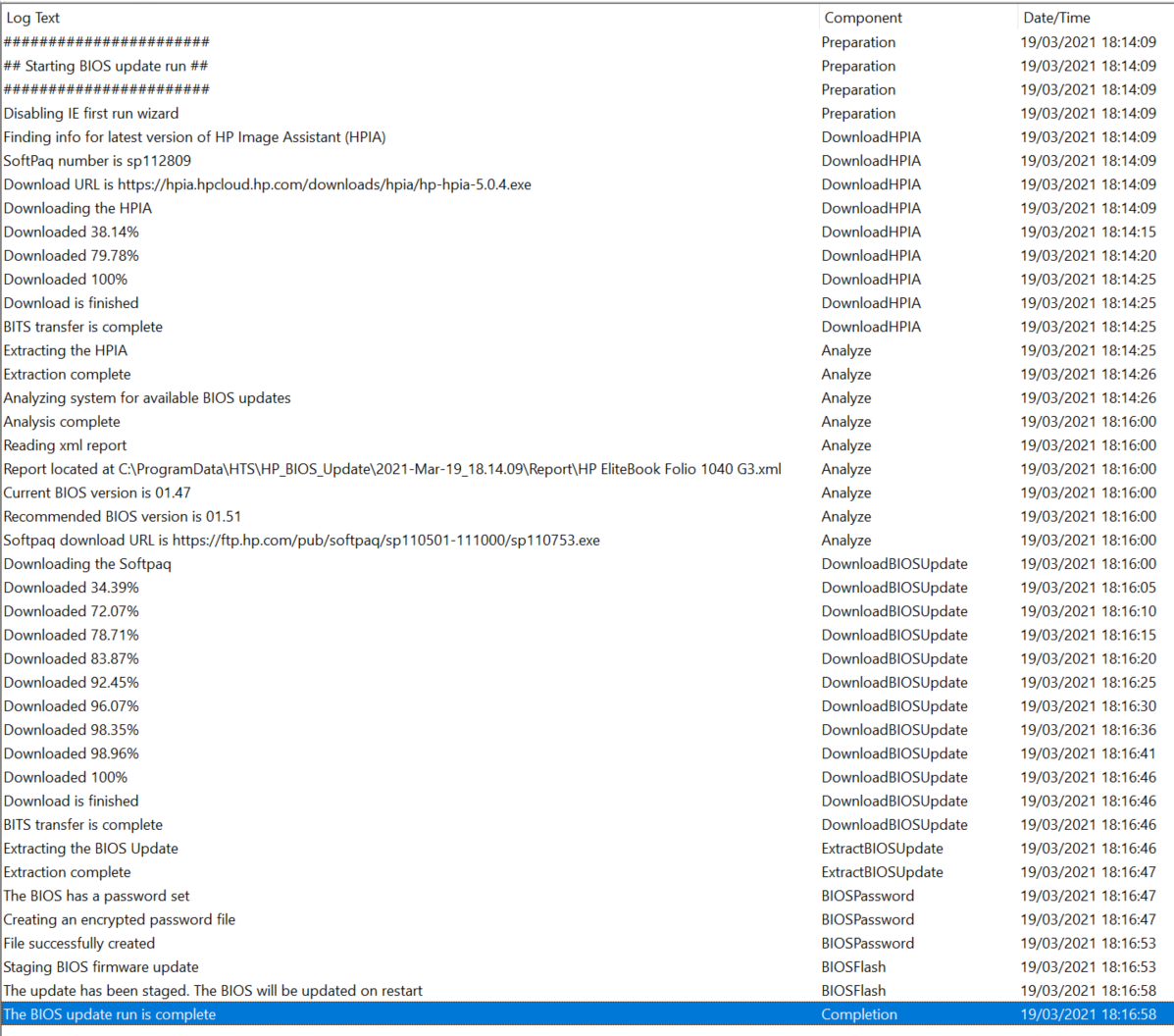
Write-Log -Message "#######################" -Component "Preparation" |
|
Write-Log -Message "## Starting BIOS update run ##" -Component "Preparation" |
|
Write-Log -Message "#######################" -Component "Preparation" |
|
|
|
|
|
################################# |
|
## Disable IE First Run Wizard ## |
|
################################# |
|
# This prevents an error running Invoke-WebRequest when IE has not yet been run in the current context |
|
Write-Log -Message "Disabling IE first run wizard" -Component "Preparation" |
|
$null = New-Item -Path "HKLM:\SOFTWARE\Policies\Microsoft" -Name "Internet Explorer" -Force |
|
$null = New-Item -Path "HKLM:\SOFTWARE\Policies\Microsoft\Internet Explorer" -Name "Main" -Force |
|
$null = New-ItemProperty -Path "HKLM:\SOFTWARE\Policies\Microsoft\Internet Explorer\Main" -Name "DisableFirstRunCustomize" -PropertyType DWORD -Value 1 -Force |
|
|
|
|
|
########################## |
|
## Get latest HPIA Info ## |
|
########################## |
|
Write-Log -Message "Finding info for latest version of HP Image Assistant (HPIA)" -Component "DownloadHPIA" |
|
try |
|
{ |
|
$HTML = Invoke-WebRequest -Uri $HPIAWebUrl -ErrorAction Stop |
|
} |
|
catch |
|
{ |
|
Write-Log -Message "Failed to download the HPIA web page. $($_.Exception.Message)" -Component "DownloadHPIA" -LogLevel 3 |
|
Upload-LogFilesToAzure |
|
throw |
|
} |
|
$HPIASoftPaqNumber = ($HTML.Links | Where {$_.href -match "hp-hpia-"}).outerText |
|
$HPIADownloadURL = ($HTML.Links | Where {$_.href -match "hp-hpia-"}).href |
|
$HPIAFileName = $HPIADownloadURL.Split('/')[-1] |
|
Write-Log -Message "SoftPaq number is $HPIASoftPaqNumber" -Component "DownloadHPIA" |
|
Write-Log -Message "Download URL is $HPIADownloadURL" -Component "DownloadHPIA" |
|
|
|
|
|
################### |
|
## Download HPIA ## |
|
################### |
|
Write-Log -Message "Downloading the HPIA" -Component "DownloadHPIA" |
|
try |
|
{ |
|
$ExistingBitsJob = Get-BitsTransfer -Name "$HPIAFileName" -AllUsers -ErrorAction SilentlyContinue |
|
If ($ExistingBitsJob) |
|
{ |
|
Write-Log -Message "An existing BITS tranfer was found. Cleaning it up." -Component "DownloadHPIA" -LogLevel 2 |
|
Remove-BitsTransfer -BitsJob $ExistingBitsJob |
|
} |
|
$BitsJob = Start-BitsTransfer -Source $HPIADownloadURL -Destination $WorkingDirectory\$HPIAFileName -Asynchronous -DisplayName "$HPIAFileName" -Description "HPIA download" -RetryInterval 60 -ErrorAction Stop |
|
do { |
|
Start-Sleep -Seconds 5 |
|
$Progress = [Math]::Round((100 * ($BitsJob.BytesTransferred / $BitsJob.BytesTotal)),2) |
|
Write-Log -Message "Downloaded $Progress`%" -Component "DownloadHPIA" |
|
} until ($BitsJob.JobState -in ("Transferred","Error")) |
|
If ($BitsJob.JobState -eq "Error") |
|
{ |
|
Write-Log -Message "BITS tranfer failed: $($BitsJob.ErrorDescription)" -Component "DownloadHPIA" -LogLevel 3 |
|
Upload-LogFilesToAzure |
|
throw |
|
} |
|
Write-Log -Message "Download is finished" -Component "DownloadHPIA" |
|
Complete-BitsTransfer -BitsJob $BitsJob |
|
Write-Log -Message "BITS transfer is complete" -Component "DownloadHPIA" |
|
} |
|
catch |
|
{ |
|
Write-Log -Message "Failed to start a BITS transfer for the HPIA: $($_.Exception.Message)" -Component "DownloadHPIA" -LogLevel 3 |
|
Upload-LogFilesToAzure |
|
throw |
|
} |
|
|
|
|
|
################## |
|
## Extract HPIA ## |
|
################## |
|
Write-Log -Message "Extracting the HPIA" -Component "Analyze" |
|
try |
|
{ |
|
$Process = Start-Process -FilePath $WorkingDirectory\$HPIAFileName -WorkingDirectory $WorkingDirectory -ArgumentList "/s /f .\HPIA\ /e" -NoNewWindow -PassThru -Wait -ErrorAction Stop |
|
Start-Sleep -Seconds 5 |
|
If (Test-Path $WorkingDirectory\HPIA\HPImageAssistant.exe) |
|
{ |
|
Write-Log -Message "Extraction complete" -Component "Analyze" |
|
} |
|
Else |
|
{ |
|
Write-Log -Message "HPImageAssistant not found!" -Component "Analyze" -LogLevel 3 |
|
Upload-LogFilesToAzure |
|
throw |
|
} |
|
} |
|
catch |
|
{ |
|
Write-Log -Message "Failed to extract the HPIA: $($_.Exception.Message)" -Component "Analyze" -LogLevel 3 |
|
Upload-LogFilesToAzure |
|
throw |
|
} |
|
|
|
|
|
############################################## |
|
## Analyze available BIOS updates with HPIA ## |
|
############################################## |
|
Write-Log -Message "Analyzing system for available BIOS updates" -Component "Analyze" |
|
try |
|
{ |
|
$Process = Start-Process -FilePath $WorkingDirectory\HPIA\HPImageAssistant.exe -WorkingDirectory $WorkingDirectory -ArgumentList "/Operation:Analyze /Category:BIOS /Selection:All /Action:List /Silent /ReportFolder:$WorkingDirectory\Report" -NoNewWindow -PassThru -Wait -ErrorAction Stop |
|
If ($Process.ExitCode -eq 0) |
|
{ |
|
Write-Log -Message "Analysis complete" -Component "Analyze" |
|
} |
|
elseif ($Process.ExitCode -eq 256) |
|
{ |
|
Write-Log -Message "The analysis returned no recommendation. No BIOS update is available at this time" -Component "Analyze" -LogLevel 2 |
|
Upload-LogFilesToAzure |
|
Exit 0 |
|
} |
|
elseif ($Process.ExitCode -eq 4096) |
|
{ |
|
Write-Log -Message "This platform is not supported!" -Component "Analyze" -LogLevel 2 |
|
Upload-LogFilesToAzure |
|
throw |
|
} |
|
Else |
|
{ |
|
Write-Log -Message "Process exited with code $($Process.ExitCode). Expecting 0." -Component "Analyze" -LogLevel 3 |
|
Upload-LogFilesToAzure |
|
throw |
|
} |
|
} |
|
catch |
|
{ |
|
Write-Log -Message "Failed to start the HPImageAssistant.exe: $($_.Exception.Message)" -Component "Analyze" -LogLevel 3 |
|
Upload-LogFilesToAzure |
|
throw |
|
} |
|
# Read the XML report |
|
Write-Log -Message "Reading xml report" -Component "Analyze" |
|
try |
|
{ |
|
$XMLFile = Get-ChildItem -Path "$WorkingDirectory\Report" -Recurse -Include *.xml -ErrorAction Stop |
|
If ($XMLFile) |
|
{ |
|
Write-Log -Message "Report located at $($XMLFile.FullName)" -Component "Analyze" |
|
try |
|
{ |
|
[xml]$XML = Get-Content -Path $XMLFile.FullName -ErrorAction Stop |
|
$Recommendation = $xml.HPIA.Recommendations.BIOS.Recommendation |
|
If ($Recommendation) |
|
{ |
|
$CurrentBIOSVersion = $Recommendation.TargetVersion |
|
$ReferenceBIOSVersion = $Recommendation.ReferenceVersion |
|
$DownloadURL = "https://" + $Recommendation.Solution.Softpaq.Url |
|
$SoftpaqFileName = $DownloadURL.Split('/')[-1] |
|
Write-Log -Message "Current BIOS version is $CurrentBIOSVersion" -Component "Analyze" |
|
Write-Log -Message "Recommended BIOS version is $ReferenceBIOSVersion" -Component "Analyze" |
|
Write-Log -Message "Softpaq download URL is $DownloadURL" -Component "Analyze" |
|
} |
|
Else |
|
{ |
|
Write-Log -Message "Failed to find a BIOS recommendation in the XML report" -Component "Analyze" -LogLevel 3 |
|
Upload-LogFilesToAzure |
|
throw |
|
} |
|
} |
|
catch |
|
{ |
|
Write-Log -Message "Failed to parse the XML file: $($_.Exception.Message)" -Component "Analyze" -LogLevel 3 |
|
Upload-LogFilesToAzure |
|
throw |
|
} |
|
} |
|
Else |
|
{ |
|
Write-Log -Message "Failed to find an XML report." -Component "Analyze" -LogLevel 3 |
|
Upload-LogFilesToAzure |
|
throw |
|
} |
|
} |
|
catch |
|
{ |
|
Write-Log -Message "Failed to find an XML report: $($_.Exception.Message)" -Component "Analyze" -LogLevel 3 |
|
Upload-LogFilesToAzure |
|
throw |
|
} |
|
|
|
|
|
############################### |
|
## Download the BIOS softpaq ## |
|
############################### |
|
Write-Log -Message "Downloading the Softpaq" -Component "DownloadBIOSUpdate" |
|
try |
|
{ |
|
$ExistingBitsJob = Get-BitsTransfer -Name "$SoftpaqFileName" -AllUsers -ErrorAction SilentlyContinue |
|
If ($ExistingBitsJob) |
|
{ |
|
Write-Log -Message "An existing BITS tranfer was found. Cleaning it up." -Component "DownloadBIOSUpdate" -LogLevel 2 |
|
Remove-BitsTransfer -BitsJob $ExistingBitsJob |
|
} |
|
$BitsJob = Start-BitsTransfer -Source $DownloadURL -Destination $WorkingDirectory\$SoftpaqFileName -Asynchronous -DisplayName "$SoftpaqFileName" -Description "BIOS update download" -RetryInterval 60 -ErrorAction Stop |
|
do { |
|
Start-Sleep -Seconds 5 |
|
$Progress = [Math]::Round((100 * ($BitsJob.BytesTransferred / $BitsJob.BytesTotal)),2) |
|
Write-Log -Message "Downloaded $Progress`%" -Component "DownloadBIOSUpdate" |
|
} until ($BitsJob.JobState -in ("Transferred","Error")) |
|
If ($BitsJob.JobState -eq "Error") |
|
{ |
|
Write-Log -Message "BITS tranfer failed: $($BitsJob.ErrorDescription)" -Component "DownloadBIOSUpdate" -LogLevel 3 |
|
Upload-LogFilesToAzure |
|
throw |
|
} |
|
Write-Log -Message "Download is finished" -Component "DownloadBIOSUpdate" |
|
Complete-BitsTransfer -BitsJob $BitsJob |
|
Write-Log -Message "BITS transfer is complete" -Component "DownloadBIOSUpdate" |
|
} |
|
catch |
|
{ |
|
Write-Log -Message "Failed to start a BITS transfer for the BIOS update: $($_.Exception.Message)" -Component "DownloadBIOSUpdate" -LogLevel 3 |
|
Upload-LogFilesToAzure |
|
throw |
|
} |
|
|
|
|
|
######################### |
|
## Extract BIOS Update ## |
|
######################### |
|
Write-Log -Message "Extracting the BIOS Update" -Component "ExtractBIOSUpdate" |
|
$BIOSUpdateDirectoryName = $SoftpaqFileName.Split('.')[0] |
|
try |
|
{ |
|
$Process = Start-Process -FilePath $WorkingDirectory\$SoftpaqFileName -WorkingDirectory $WorkingDirectory -ArgumentList "/s /f .\$BIOSUpdateDirectoryName\ /e" -NoNewWindow -PassThru -Wait -ErrorAction Stop |
|
Start-Sleep -Seconds 5 |
|
$HpFirmwareUpdRec = Get-ChildItem -Path $WorkingDirectory -Include HpFirmwareUpdRec.exe -Recurse -ErrorAction SilentlyContinue |
|
$HPBIOSUPDREC = Get-ChildItem -Path $WorkingDirectory -Include HPBIOSUPDREC.exe -Recurse -ErrorAction SilentlyContinue |
|
If ($HpFirmwareUpdRec) |
|
{ |
|
$BIOSExecutable = $HpFirmwareUpdRec |
|
} |
|
ElseIf ($HPBIOSUPDREC) |
|
{ |
|
$BIOSExecutable = $HPBIOSUPDREC |
|
} |
|
Else |
|
{ |
|
Write-Log -Message "BIOS update executable not found!" -Component "ExtractBIOSUpdate" -LogLevel 3 |
|
Upload-LogFilesToAzure |
|
throw |
|
} |
|
Write-Log -Message "Extraction complete" -Component "ExtractBIOSUpdate" |
|
} |
|
catch |
|
{ |
|
Write-Log -Message "Failed to extract the softpaq: $($_.Exception.Message)" -Component "ExtractBIOSUpdate" -LogLevel 3 |
|
Upload-LogFilesToAzure |
|
throw |
|
} |
|
|
|
|
|
############################# |
|
## Check for BIOS password ## |
|
############################# |
|
try |
|
{ |
|
$SetupPwd = (Get-CimInstance -Namespace ROOT\HP\InstrumentedBIOS -ClassName HP_BIOSPassword -Filter "Name='Setup Password'" -ErrorAction Stop).IsSet |
|
If ($SetupPwd -eq 1) |
|
{ |
|
Write-Log -Message "The BIOS has a password set" -Component "BIOSPassword" |
|
$BIOSPasswordSet = $true |
|
} |
|
Else |
|
{ |
|
Write-Log -Message "No password has been set on the BIOS" -Component "BIOSPassword" |
|
} |
|
} |
|
catch |
|
{ |
|
Write-Log -Message "Unable to determine if a BIOS password has been set: $($_.Exception.Message)" -Component "BIOSPassword" -LogLevel 3 |
|
Upload-LogFilesToAzure |
|
throw |
|
} |
|
|
|
|
|
########################## |
|
## Create password file ## |
|
########################## |
|
If ($BIOSPasswordSet) |
|
{ |
|
Write-Log -Message "Creating an encrypted password file" -Component "BIOSPassword" |
|
$HpqPswd = Get-ChildItem -Path $WorkingDirectory -Include HpqPswd.exe -Recurse -ErrorAction SilentlyContinue |
|
If ($HpqPswd) |
|
{ |
|
try |
|
{ |
|
$Process = Start-Process -FilePath $HpqPswd.FullName -WorkingDirectory $WorkingDirectory -ArgumentList "-p""$BIOSPassword"" -f.\password.bin -s" -NoNewWindow -PassThru -Wait -ErrorAction Stop |
|
Start-Sleep -Seconds 5 |
|
If (Test-Path $WorkingDirectory\password.bin) |
|
{ |
|
Write-Log -Message "File successfully created" -Component "BIOSPassword" |
|
} |
|
Else |
|
{ |
|
Write-Log -Message "Encrypted password file could not be found!" -Component "BIOSPassword" -LogLevel 3 |
|
Upload-LogFilesToAzure |
|
throw |
|
} |
|
} |
|
catch |
|
{ |
|
Write-Log -Message "Failed to create an encrypted password file: $($_.Exception.Message)" -Component "BIOSPassword" -LogLevel 3 |
|
Upload-LogFilesToAzure |
|
throw |
|
} |
|
} |
|
else |
|
{ |
|
Write-Log -Message "Failed to locate HP password encryption utility!" -Component "BIOSPassword" -LogLevel 3 |
|
Upload-LogFilesToAzure |
|
throw |
|
} |
|
} |
|
|
|
|
|
########################### |
|
## Stage the BIOS update ## |
|
########################### |
|
Write-Log -Message "Staging BIOS firmware update" -Component "BIOSFlash" |
|
try |
|
{ |
|
If ($BIOSPasswordSet) |
|
{ |
|
$Process = Start-Process -FilePath "$($BIOSExecutable.FullName)" -WorkingDirectory $WorkingDirectory -ArgumentList "-s -p.\password.bin -f.\$BIOSUpdateDirectoryName -r -b" -NoNewWindow -PassThru -Wait -ErrorAction Stop |
|
} |
|
Else |
|
{ |
|
$Process = Start-Process -FilePath "$($BIOSExecutable.FullName)" -WorkingDirectory $WorkingDirectory -ArgumentList "-s -f.\$BIOSUpdateDirectoryName -r -b" -NoNewWindow -PassThru -Wait -ErrorAction Stop |
|
} |
|
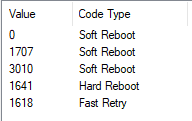
If ($Process.ExitCode -eq 3010) |
|
{ |
|
Write-Log -Message "The update has been staged. The BIOS will be updated on restart" -Component "BIOSFlash" |
|
} |
|
Else |
|
{ |
|
Write-Log -Message "An unexpected exit code was returned: $($Process.ExitCode)" -Component "BIOSFlash" -LogLevel 3 |
|
Upload-LogFilesToAzure |
|
throw |
|
} |
|
} |
|
catch |
|
{ |
|
Write-Log -Message "Failed to stage BIOS update: $($_.Exception.Message)" -Component "BIOSFlash" -LogLevel 3 |
|
Upload-LogFilesToAzure |
|
throw |
|
} |
|
Write-Log -Message "This BIOS update run is complete. Have a nice day!" -Component "Completion" |
|
Upload-LogFilesToAzure |