Just a quick one 🙂
If you’re like me you are too lazy busy to regularly check the component status of an SCCM Site Server for any issues, so why not get PowerShell to do it for you?
The code below will email an html-formatted report of any site components that are currently in an error or warning status, together with the last few error or warning status messages for each component. Run it as a scheduled task or with your favorite automation tool to keep your eye on any current issues. Whether you get annoyed because you now created more work for yourself, or get happy because you can stay on top of issues in your SCCM environment, I leave to you!
The report will display the components that are marked as either critical or warning with the current number of messages:
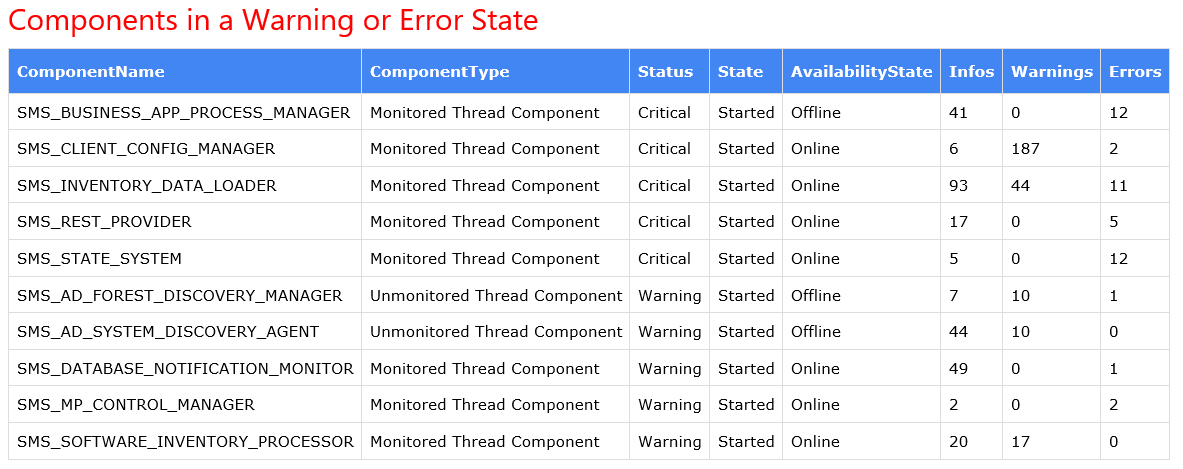
It will then display the last x status messages for each component for a quick view of what the current issue/s are:

Run the script either on the site server or somewhere where the SCCM console is installed, and set the required parameters in the script.
| ##################################################################################################### | |
| ## ## | |
| ## This script checks for any SCCM Site Server components currently in an error or warning ## | |
| ## state and emails it as an html report, including the latest status messages for each component. ## | |
| ## ## | |
| ##################################################################################################### | |
| ################ | |
| ## PARAMETERS ## | |
| ################ | |
| # Site server FQDN | |
| $SiteServer = "SCCMServer.Contoso.com" | |
| # Site code | |
| $SiteCode = "ABC" | |
| # Location of the resource dlls in the SCCM admin console path | |
| $script:SMSMSGSLocation = “$env:SMS_ADMIN_UI_PATH\00000409” | |
| # SCCM SQL Server / instance | |
| $script:dataSource = 'SCCMServer' | |
| # SCCM SQL database | |
| $script:database = 'CM_ABC' | |
| # Number of Status messages to report | |
| $SMCount = 5 | |
| # Tally interval – see https://docs.microsoft.com/en-us/sccm/develop/core/servers/manage/about-configuration-manager-tally-intervals | |
| $TallyInterval = '0001128000100008' | |
| # Email params | |
| $EmailParams = @{ | |
| To = 'joe.bloggs@contoso.com' | |
| From = 'SCCMReports@contoso.com' | |
| Smtpserver = 'contoso-com.mail.protection.outlook.com' | |
| Port = 25 | |
| Subject = "SCCM Site Server Component Status Report | $SiteServer | $SiteCode | $(Get-Date -Format dd-MMM-yyyy)" | |
| } | |
| # Html CSS style | |
| $Style = @" | |
| <style> | |
| table { | |
| border-collapse: collapse; | |
| } | |
| td, th { | |
| border: 1px solid #ddd; | |
| padding: 8px; | |
| } | |
| th { | |
| padding-top: 12px; | |
| padding-bottom: 12px; | |
| text-align: left; | |
| background-color: #4286f4; | |
| color: white; | |
| } | |
| h2 { | |
| color: red; | |
| } | |
| </style> | |
| "@ | |
| ############### | |
| ## FUNCTIONS ## | |
| ############### | |
| # Function to get data from SQL server | |
| function Get-SQLData { | |
| param($Query) | |
| $connectionString = "Server=$dataSource;Database=$database;Integrated Security=SSPI;" | |
| $connection = New-Object -TypeName System.Data.SqlClient.SqlConnection | |
| $connection.ConnectionString = $connectionString | |
| $connection.Open() | |
| $command = $connection.CreateCommand() | |
| $command.CommandText = $Query | |
| $reader = $command.ExecuteReader() | |
| $table = New-Object -TypeName 'System.Data.DataTable' | |
| $table.Load($reader) | |
| # Close the connection | |
| $connection.Close() | |
| return $Table | |
| } | |
| # Function to get the status message description | |
| function Get-StatusMessage { | |
| param ( | |
| $MessageID, | |
| [ValidateSet("srvmsgs.dll","provmsgs.dll","climsgs.dll")]$DLL, | |
| [ValidateSet("Informational","Warning","Error")]$Severity, | |
| $InsString1, | |
| $InsString2, | |
| $InsString3, | |
| $InsString4, | |
| $InsString5, | |
| $InsString6, | |
| $InsString7, | |
| $InsString8, | |
| $InsString9, | |
| $InsString10 | |
| ) | |
| # Set the resources dll | |
| Switch ($DLL) | |
| { | |
| "srvmsgs.dll" { $stringPathToDLL = "$SMSMSGSLocation\srvmsgs.dll" } | |
| "provmsgs.dll" { $stringPathToDLL = "$SMSMSGSLocation\provmsgs.dll" } | |
| "climsgs.dll" { $stringPathToDLL = "$SMSMSGSLocation\climsgs.dll" } | |
| } | |
| # Load Status Message Lookup DLL into memory and get pointer to memory | |
| $ptrFoo = $Win32LoadLibrary::LoadLibrary($stringPathToDLL.ToString()) | |
| $ptrModule = $Win32GetModuleHandle::GetModuleHandle($stringPathToDLL.ToString()) | |
| # Set severity code | |
| Switch ($Severity) | |
| { | |
| "Informational" { $code = 1073741824 } | |
| "Warning" { $code = 2147483648 } | |
| "Error" { $code = 3221225472 } | |
| } | |
| # Format the message | |
| $result = $Win32FormatMessage::FormatMessage($flags, $ptrModule, $Code -bor $MessageID, 0, $stringOutput, $sizeOfBuffer, $stringArrayInput) | |
| if ($result -gt 0) | |
| { | |
| # Add insert strings to message | |
| $objMessage = New-Object System.Object | |
| $objMessage | Add-Member -type NoteProperty -name MessageString -value $stringOutput.ToString().Replace("%11","").Replace("%12","").Replace("%3%4%5%6%7%8%9%10","").Replace("%1",$InsString1).Replace("%2",$InsString2).Replace("%3",$InsString3).Replace("%4",$InsString4).Replace("%5",$InsString5).Replace("%6",$InsString6).Replace("%7",$InsString7).Replace("%8",$InsString8).Replace("%9",$InsString9).Replace("%10",$InsString10) | |
| } | |
| Return $objMessage | |
| } | |
| ################# | |
| ## MAIN SCRIPT ## | |
| ################# | |
| # SQL query for component status | |
| $Query = " | |
| Select | |
| ComponentName, | |
| ComponentType, | |
| Case | |
| when Status = 0 then 'OK' | |
| when Status = 1 then 'Warning' | |
| when Status = 2 then 'Critical' | |
| End as 'Status', | |
| Case | |
| when State = 0 then 'Stopped' | |
| when State = 1 then 'Started' | |
| when State = 2 then 'Paused' | |
| when State = 3 then 'Installing' | |
| when State = 4 then 'Re-installing' | |
| when State = 5 then 'De-installing' | |
| End as 'State', | |
| Case | |
| When AvailabilityState = 0 then 'Online' | |
| When AvailabilityState = 3 then 'Offline' | |
| When AvailabilityState = 4 then 'Unknown' | |
| End as 'AvailabilityState', | |
| Infos, | |
| Warnings, | |
| Errors | |
| from vSMS_ComponentSummarizer | |
| where TallyInterval = N'$TallyInterval' | |
| and MachineName = '$SiteServer' | |
| and SiteCode = '$SiteCode ' | |
| and Status in (1,2) | |
| Order by Status,ComponentName | |
| " | |
| $Results = Get-SQLData -Query $Query | |
| # Convert results to HTML | |
| $HTML = $Results | | |
| ConvertTo-Html -Property "ComponentName","ComponentType","Status","State","AvailabilityState","Infos","Warnings","Errors" -Head $Style -Body "<h2>Components in a Warning or Error State</h2>" -CssUri "http://www.w3schools.com/lib/w3.css" | | |
| Out-String | |
| $HTML = $HTML + "<h2></h2><h2>Last $SMCount Error or Warning Status Messages for…</h2>" | |
| If ($Results) | |
| { | |
| # Start PInvoke Code | |
| $sigFormatMessage = @' | |
| [DllImport("kernel32.dll")] | |
| public static extern uint FormatMessage(uint flags, IntPtr source, uint messageId, uint langId, StringBuilder buffer, uint size, string[] arguments); | |
| '@ | |
| $sigGetModuleHandle = @' | |
| [DllImport("kernel32.dll")] | |
| public static extern IntPtr GetModuleHandle(string lpModuleName); | |
| '@ | |
| $sigLoadLibrary = @' | |
| [DllImport("kernel32.dll")] | |
| public static extern IntPtr LoadLibrary(string lpFileName); | |
| '@ | |
| $Win32FormatMessage = Add-Type -MemberDefinition $sigFormatMessage -name "Win32FormatMessage" -namespace Win32Functions -PassThru -Using System.Text | |
| $Win32GetModuleHandle = Add-Type -MemberDefinition $sigGetModuleHandle -name "Win32GetModuleHandle" -namespace Win32Functions -PassThru -Using System.Text | |
| $Win32LoadLibrary = Add-Type -MemberDefinition $sigLoadLibrary -name "Win32LoadLibrary" -namespace Win32Functions -PassThru -Using System.Text | |
| #End PInvoke Code | |
| $sizeOfBuffer = [int]16384 | |
| $stringArrayInput = {"%1","%2","%3","%4","%5", "%6", "%7", "%8", "%9"} | |
| $flags = 0x00000800 -bor 0x00000200 | |
| $stringOutput = New-Object System.Text.StringBuilder $sizeOfBuffer | |
| # Process each resulting component | |
| Foreach ($Result in $Results) | |
| { | |
| # Query SQL for status messages | |
| $Component = $Result.ComponentName | |
| $SMQuery = " | |
| select | |
| top $SMCount | |
| smsgs.RecordID, | |
| CASE smsgs.Severity | |
| WHEN -1073741824 THEN 'Error' | |
| WHEN 1073741824 THEN 'Informational' | |
| WHEN -2147483648 THEN 'Warning' | |
| ELSE 'Unknown' | |
| END As 'SeverityName', | |
| case smsgs.MessageType | |
| WHEN 256 THEN 'Milestone' | |
| WHEN 512 THEN 'Detail' | |
| WHEN 768 THEN 'Audit' | |
| WHEN 1024 THEN 'NT Event' | |
| ELSE 'Unknown' | |
| END AS 'Type', | |
| smsgs.MessageID, | |
| smsgs.Severity, | |
| smsgs.MessageType, | |
| smsgs.ModuleName, | |
| modNames.MsgDLLName, | |
| smsgs.Component, | |
| smsgs.MachineName, | |
| smsgs.Time, | |
| smsgs.SiteCode, | |
| smwis.InsString1, | |
| smwis.InsString2, | |
| smwis.InsString3, | |
| smwis.InsString4, | |
| smwis.InsString5, | |
| smwis.InsString6, | |
| smwis.InsString7, | |
| smwis.InsString8, | |
| smwis.InsString9, | |
| smwis.InsString10 | |
| from v_StatusMessage smsgs | |
| join v_StatMsgWithInsStrings smwis on smsgs.RecordID = smwis.RecordID | |
| join v_StatMsgModuleNames modNames on smsgs.ModuleName = modNames.ModuleName | |
| where smsgs.MachineName = '$SiteServer' | |
| and smsgs.Component = '$Component' | |
| and smsgs.Severity in ('-1073741824','-2147483648') | |
| Order by smsgs.Time DESC | |
| " | |
| $StatusMsgs = Get-SQLData -Query $SMQuery | |
| # Put desired fields into an object for each result | |
| $StatusMessages = @() | |
| foreach ($Row in $StatusMsgs) | |
| { | |
| $Params = @{ | |
| MessageID = $Row.MessageID | |
| DLL = $Row.MsgDLLName | |
| Severity = $Row.SeverityName | |
| InsString1 = $Row.InsString1 | |
| InsString2 = $Row.InsString2 | |
| InsString3 = $Row.InsString3 | |
| InsString4 = $Row.InsString4 | |
| InsString5 = $Row.InsString5 | |
| InsString6 = $Row.InsString6 | |
| InsString7 = $Row.InsString7 | |
| InsString8 = $Row.InsString8 | |
| InsString9 = $Row.InsString9 | |
| InsString10 = $Row.InsString10 | |
| } | |
| $Message = Get-StatusMessage @params | |
| $StatusMessage = New-Object psobject | |
| Add-Member -InputObject $StatusMessage -Name Severity -MemberType NoteProperty -Value $Row.SeverityName | |
| Add-Member -InputObject $StatusMessage -Name Type -MemberType NoteProperty -Value $Row.Type | |
| Add-Member -InputObject $StatusMessage -Name SiteCode -MemberType NoteProperty -Value $Row.SiteCode | |
| Add-Member -InputObject $StatusMessage -Name "Date / Time" -MemberType NoteProperty -Value $Row.Time | |
| Add-Member -InputObject $StatusMessage -Name System -MemberType NoteProperty -Value $Row.MachineName | |
| Add-Member -InputObject $StatusMessage -Name Component -MemberType NoteProperty -Value $Row.Component | |
| Add-Member -InputObject $StatusMessage -Name Module -MemberType NoteProperty -Value $Row.ModuleName | |
| Add-Member -InputObject $StatusMessage -Name MessageID -MemberType NoteProperty -Value $Row.MessageID | |
| Add-Member -InputObject $StatusMessage -Name Description -MemberType NoteProperty -Value $Message.MessageString | |
| $StatusMessages += $StatusMessage | |
| } | |
| # Add to the HTML code | |
| $HTML = $HTML + ( | |
| $StatusMessages | | |
| ConvertTo-Html -Property "Severity","Date / Time","MessageID","Description" -Head $Style -Body "<h2>$Component</h2>" -CssUri "http://www.w3schools.com/lib/w3.css" | | |
| Out-String | |
| ) | |
| } | |
| # Fire the email | |
| Send-MailMessage @EmailParams -Body $Html -BodyAsHtml | |
| } |

Thank you so much for this tool! I use it daily.
Something has changed for me recently, I get errors now in every component group. The first one is fine “components in a warning or error state”, but when I look at SMS_AD_SECURITY_GROUP_DISCOVERY_AGENT >> all are messageID 5354.
when I run the reports in the console, it works. But when I run it in IE11, I get the issue
Thanks for the feedback – I use it daily too! It’s still working fine for me, though – I’m not getting any errors. Do you get any visible errors when you run the script?
if I run line 261, it can’t seem to connect
PS C:\Windows\system32> Get-SQLData -Query $SMQuery
RecordID : 72057594172259465
SeverityName : Error
Type : Milestone
MessageID : 8706
Severity : -1073741824
MessageType : 256
ModuleName : SMS Server
MsgDLLName : srvmsgs.dll
Component : SMS_RULE_ENGINE
MachineName : SCCM001
Time : 2023-07-25 6:18:18 AM
SiteCode : SCCMSITE
InsString1 : SMS Rule Engine
InsString2 : Failed to download one or more content files
InsString3 :
InsString4 :
InsString5 :
InsString6 :
InsString7 :
InsString8 :
InsString9 :
InsString10 :
RecordID : 72057594172226725
SeverityName : Error
Type : Milestone
MessageID : 8706
Severity : -1073741824
MessageType : 256
ModuleName : SMS Server
MsgDLLName : srvmsgs.dll
Component : SMS_RULE_ENGINE
MachineName : SCCM001
Time : 2023-07-24 6:20:11 AM
SiteCode : SCCMSITE
InsString1 : SMS Rule Engine
InsString2 : Failed to download one or more content files
InsString3 :
InsString4 :
InsString5 :
InsString6 :
InsString7 :
InsString8 :
InsString9 :
InsString10 :
RecordID : 72057594172210345
SeverityName : Error
Type : Milestone
MessageID : 8706
Severity : -1073741824
MessageType : 256
ModuleName : SMS Server
MsgDLLName : srvmsgs.dll
Component : SMS_RULE_ENGINE
MachineName : SCCM001
Time : 2023-07-23 6:20:00 AM
SiteCode : SCCMSITE
InsString1 : SMS Rule Engine
InsString2 : Failed to download one or more content files
InsString3 :
InsString4 :
InsString5 :
InsString6 :
InsString7 :
InsString8 :
InsString9 :
InsString10 :
RecordID : 72057594172153612
SeverityName : Error
Type : Milestone
MessageID : 8706
Severity : -1073741824
MessageType : 256
ModuleName : SMS Server
MsgDLLName : srvmsgs.dll
Component : SMS_RULE_ENGINE
MachineName : SCCM001
Time : 2023-07-22 6:22:59 AM
SiteCode : SCCMSITE
InsString1 : SMS Rule Engine
InsString2 : Failed to download one or more content files
InsString3 :
InsString4 :
InsString5 :
InsString6 :
InsString7 :
InsString8 :
InsString9 :
InsString10 :
RecordID : 72057594172122317
SeverityName : Error
Type : Milestone
MessageID : 8706
Severity : -1073741824
MessageType : 256
ModuleName : SMS Server
MsgDLLName : srvmsgs.dll
Component : SMS_RULE_ENGINE
MachineName : SCCM001
Time : 2023-07-21 6:17:46 AM
SiteCode : SCCMSITE
InsString1 : SMS Rule Engine
InsString2 : Failed to download one or more content files
InsString3 :
InsString4 :
InsString5 :
InsString6 :
InsString7 :
InsString8 :
InsString9 :
InsString10 :